Photo proof and attendance for your whole team
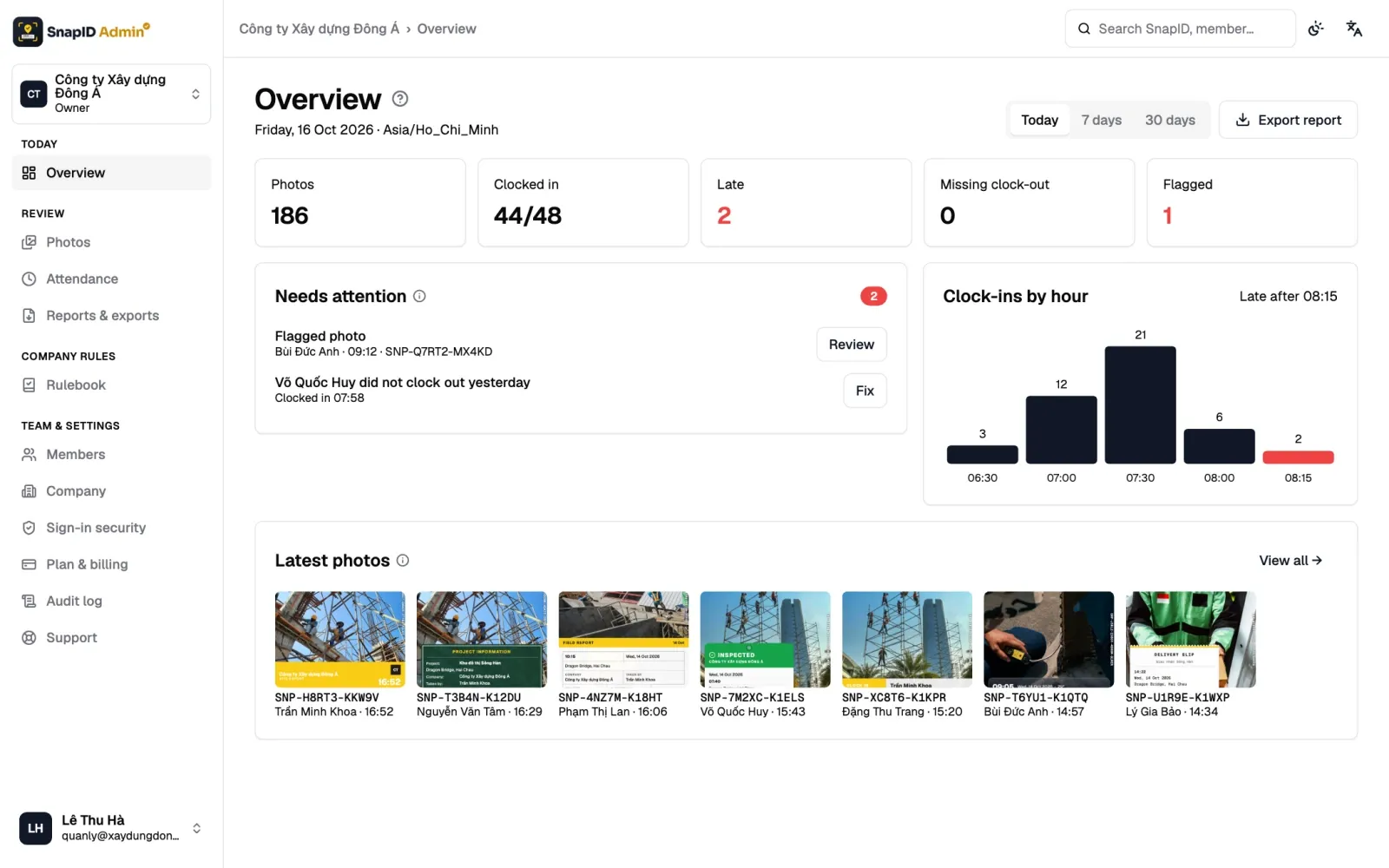
Create a workspace for your company. Members take work photos and clock in with a photo on site, while Owners and Admins review everything on the admin website at app.snapidmark.com.
What your company gets
One account for personal use and multiple workspaces. Members clock in and out with a photo on site, and Owners and Admins follow everything at app.snapidmark.com.
- Sites with geofencesDefine sites and an allowed radius. Photos taken outside it are flagged.
- Attendance reportsOn time, late and hours worked per day. Add manual entries when needed, with a change log.
- Photo review with integrity flagsMock GPS, clock drift, outside geofence, late upload… surfaced clearly for Owners and Admins to review.
- Members, roles, required templatesInvite by code or CSV, Owner / Admin / Member roles, lock the company stamp template.
- Audit log & exportsEvery admin action is recorded. Export reports and photos when you need to reconcile.
One rulebook for the whole company
The Rulebook on the admin website gathers every rule members meet when they shoot and clock in, with a live preview of what members will see.
- Stamp templates: one required template, a choice among templates the company approved, or personal templates.
- Required details: the fields members fill in when they shoot.
- Workplaces: sites with a geofence radius from 20 m to 50 km, and projects.
- Shifts & attendance: shift start, late threshold, work days, breaks and time zone.
- Anti-fraud: fake GPS is always rejected, and you can block rooted or jailbroken phones.
- Branding: company name, logo and details on the stamp.
Bring your team in
- Invite by link, QR code, 6-character code or email, or import a CSV file on the admin website.
- Owner, Admin and Member roles. Only the Owner manages Admins, the plan and sign-in security.
- Photo sending per member: Automatic or Manual (Manual by default). Attendance photos are always sent right away.
- Two-step verification for the Owner and Admins, idle sign-out, and signing out every session of a lost phone.
Photo attendance that holds up
- Clock in and Clock out with one photo, front or back camera, no selfie required.
- Trusted capture time: an offline clock-in is recorded at the right day and time when it uploads later.
- Daily status: On time, Late, Missing clock-in, Missing clock-out, Absent, Day off.
- Timesheets by day, week and month. Owners and Admins can add a missing clock-out.
Review and export
- Filter photos by member, project, site, photo type, warnings, date or custom field.
- Export a ZIP of originals with metadata.csv or an Excel file (up to 2000 photos), a PDF report (up to 200 photos) or an Excel timesheet.
- An audit log of important changes, kept for 365 days.
- Support tickets with the SnapID team, right on the admin website.
5 seats free, more as you grow
Every workspace starts with 5 free seats, no payment card needed. The Owner buys plans of 10, 25, 50 or 100 seats in the app. Workspaces have no ads.
See full pricingHow to get started
- Create a workspace in the app or on the admin website.
- The SnapID team reviews it by hand and emails you the result.
- Set your rules in the Rulebook.
- Invite members: they take photos and clock in from their phones.
- Review photos and timesheets, then export.
Start stamping your photos today
Get SnapID Mark on your phone, or create a workspace on the admin website.