
Fingerprint Time Clock vs Attendance App: Which to Choose?
Fingerprint time clock vs attendance app: cost of ownership, buddy punching, hygiene, multiple sites, field staff, hybrid setups and how to switch.
The fingerprint reader by the office door is familiar to many businesses. Then the company opens a second branch, takes on new job sites or hires field sales staff, and a question comes up: buy another machine for every location, or move to a mobile attendance app? And if you move, do you move everyone or only part of the team?
We make SnapID Mark, a photo attendance app, so this is written from the app side. We try to stay fair: in plenty of cases a fingerprint machine is still the right choice. A broader look at five attendance methods is in attendance methods compared. This guide goes deeper into one decision: keep the machine or use an app.
Quick verdict
| Situation | Suggestion |
|---|---|
| One office or factory, everyone enters through the same door | A fingerprint (or face) terminal is still quick and simple |
| Many small branches with a few people each | An app usually costs less than buying and maintaining many machines |
| Changing job sites, field sales, installers | An app on the phone, since there is nowhere to mount a machine |
| You need photo proof for clients | A GPS photo attendance app |
| Stable office, field crews still on paper sign-in sheets | Hybrid: keep the machine at the office, use an app in the field |
Cost of ownership: look past the device price
This guide gives no figures because prices vary by brand and change over time. Instead, list every cost before comparing.
Fingerprint time clock:
- A device for every clock-in point. Five branches means five machines.
- Installation, power, network, sometimes a backup power supply.
- Software to build timesheets, or a fee to connect the machine to your HR system.
- Maintenance, replacements, worn sensors.
- Staff time to pull data, handle “fingerprint not recognized” cases and enter missed punches.
Mobile attendance app:
- A subscription per user or per plan. Check each vendor’s pricing page.
- A smartphone for each person. If the company has to provide phones, this is the biggest cost.
- Time to help staff install and learn the app.
- Manager time to review flags such as outside the zone, weak GPS or late uploads.
A simple rule: machine costs grow with the number of locations, app costs grow with the number of people. A 300-person factory with one gate usually favors a machine. Ten shops with four people each usually favor an app.
Buddy punching and fraud
A fingerprint machine is good at stopping one worker from clocking in for another, because it needs that person’s finger. But it only proves the person walked through the door, not where they worked afterwards. Some readers can be fooled by fake fingerprint molds, and worn or dirty fingers are often misread.
A Wi-Fi attendance app only proves the phone is on the office network. A coworker holding someone else’s phone can still clock in.
A GPS attendance app proves the phone is inside the allowed zone. The risks are mock-location apps and changed phone clocks, so pick an app that syncs time with its server and detects fake locations.
A GPS photo attendance app adds a photo taken on site. The photo does not recognize faces by itself, but a reviewer can see the context. For stricter control, your policy can ask for a selfie with the front camera. Each fraud type is covered in how to stop attendance fraud.
Hygiene and biometric data
A fingerprint reader is shared equipment touched by every worker every day. Some companies choose touch-free methods for this reason alone. For mechanics or masons with oil or cement on their hands, readers can be slow and need several tries.
Fingerprints are also biometric data. Vietnam’s Personal Data Protection Law No. 91/2025/QH15, in force since 1 January 2026, has specific rules for biometric data and for location data. Whether you use a machine or an app, tell staff the purpose, get consent and have a rule for deleting data when someone leaves. This is general information, not legal advice. A deeper look is in face recognition vs GPS photo attendance.
Multiple sites and field staff
This is usually the real reason businesses move away from machines:
- Every branch needs a machine, and someone has to merge data from all of them into one sheet.
- Job sites change every few months. Nobody carries a time clock to each new site.
- Field sales, delivery and service technicians start their shift at a customer’s place, not at the office.
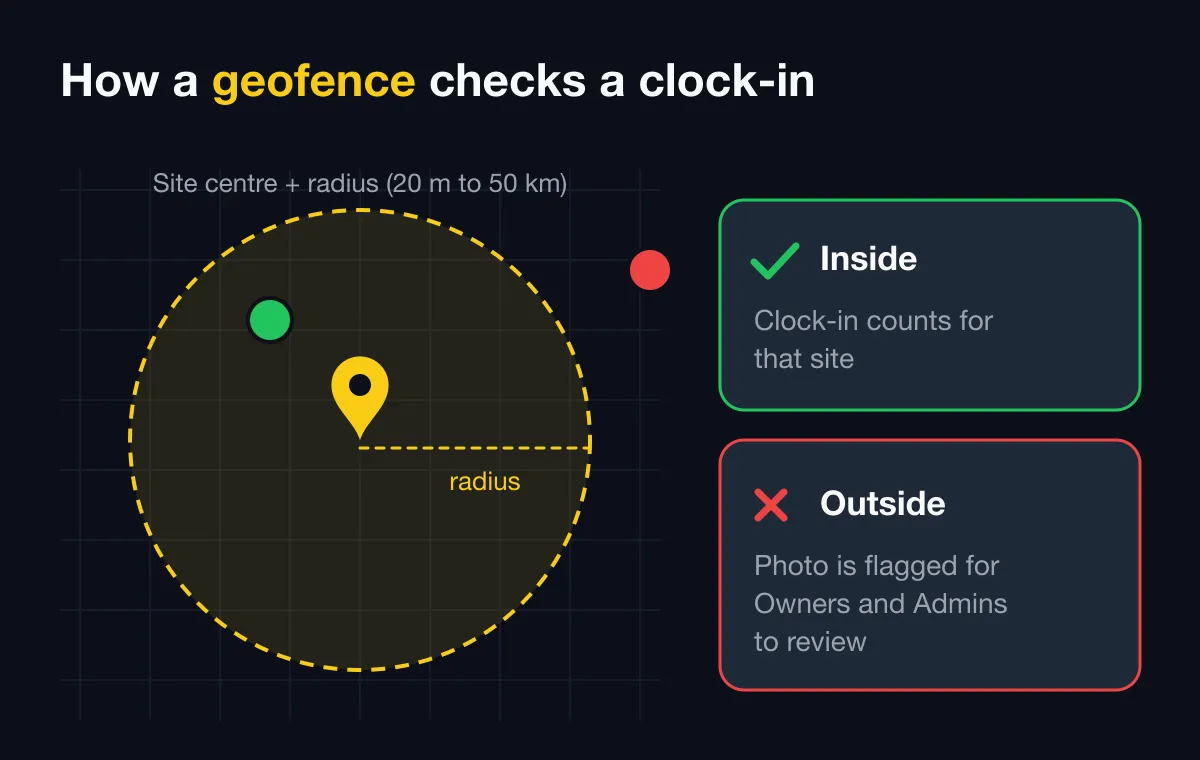
A phone app handles this: adding a new site is just entering coordinates and a radius. See multi-location attendance and clock in with a phone app.
Comparison table
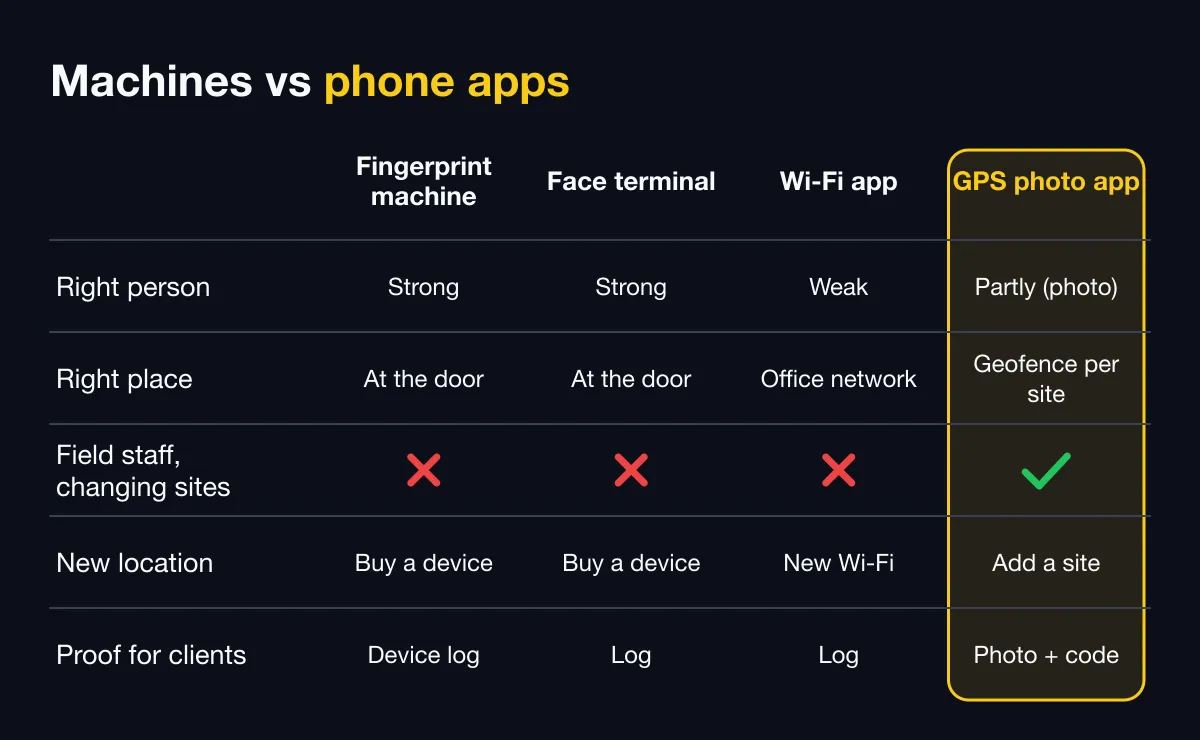
| Criterion | Fingerprint machine | Face terminal | Wi-Fi attendance app | GPS photo app (like SnapID Mark) |
|---|---|---|---|---|
| Hardware | Buy a device per point | Buy a device per point | Staff phones | Staff phones |
| Proves the right person | Strong | Strong | Weak | Partly, through the photo and a reviewer |
| Proves the right place | Strong at the door | Strong at the door | Only on the office network | Geofence around each site |
| Field staff, changing sites | Not suited | Not suited | Not suited | Suited |
| Adding a new location | Buy and install a device | Buy and install a device | Configure new Wi-Fi | Add a site on the admin website |
| Shared touch surface | Yes | No | No | No |
| Biometrics | Yes (fingerprint) | Yes (face) | No | No recognition used |
| Proof for clients | Device log | Log, sometimes a photo | Log | Photo with time, location and verification code |
| No signal | Depends on local storage | Depends on device | Cannot clock in | SnapID Mark: correct time recorded, sent later |
| Busy shift change | Fast, but people queue | Fast, but people queue | Each person on their own phone | Each person on their own phone |
Some HR systems combine data from machines and apps. For example, MISA AMIS’s official pages, as of October 2026, describe connecting fingerprint machines alongside GPS, Wi-Fi, QR and face clock-in. See the MISA AMIS attendance alternative.
Hybrid setups
Many companies do not remove machines entirely. A common setup:
- Office and workshop: keep the fingerprint or face terminal at the entrance.
- Field crews and small branches: clock in with GPS photos on their phones.
- Month end: export timesheets from both sources to Excel and let the accountant merge them for payroll.
This keeps the hardware you already paid for and uses the app only where a machine cannot reach.
What SnapID Mark does and does not do
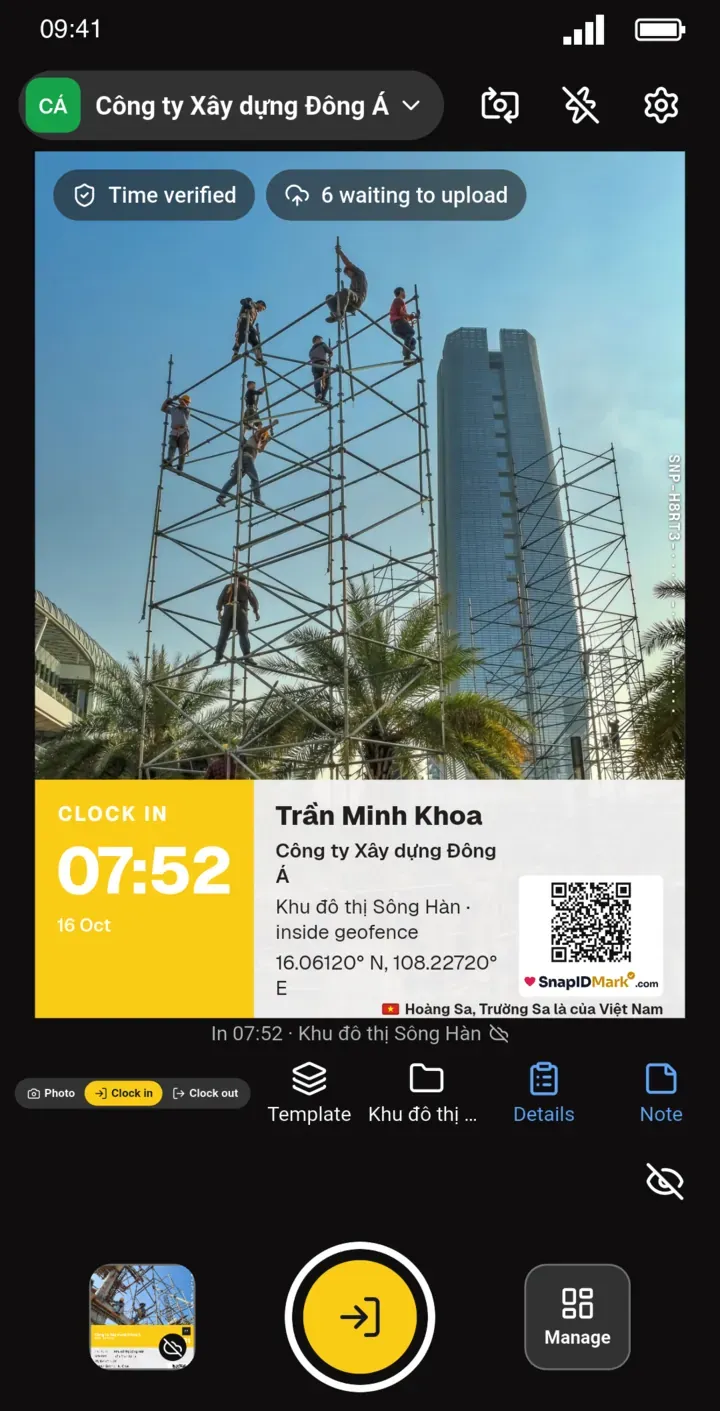
SnapID Mark is a verified camera with Clock in and Clock out modes. Each clock-in is a photo with time synced to SnapID servers, coordinates, address, a SnapID code and a QR code. The photo is checked against each site’s geofence of 20 m to 50 km. In a workspace, capture is blocked while a mock-location app is on. It works without signal: the photo waits on the phone and is sent when back online. Location is read only while the app is open, with no all-day tracking. Owners and Admins see on time, late and hours worked, and export an Excel timesheet from the admin website.
SnapID Mark does not have face recognition, Wi-Fi or QR clock-in, fingerprint machine links, a shared kiosk, payroll or an API. If you need those, a time clock or HR system fits better.
Moving from a machine to an app in 6 steps
- Pick a pilot group. Start with a field crew or one branch, about 5 people. Keep the machine running in parallel.
- Create a workspace and sites. On the admin website, add each site with a radius. See geofence attendance radius.
- Set attendance rules. Shift start, late-after time, work days and breaks.
- Invite members and train them. Invite by code, link or CSV, and show the Clock in and Clock out modes. See Photo attendance.
- Write a short policy. State what data is collected, when, and who can see it.
- Compare after two weeks. Export the Excel timesheet and check it against the machine data. Only when the numbers match and the team is comfortable, consider retiring the machine at that location.
FAQ
Can an attendance app fully replace a fingerprint machine?
For field crews and small branches, usually yes. For a large factory where everyone uses one gate, a fixed machine is still faster and better at stopping buddy punching.
Can fingerprint time clocks be cheated?
They are harder to cheat than cards or Wi-Fi, but fake fingerprint molds have been used. A machine also cannot show where someone worked after passing the door.
What about staff without smartphones?
An app needs a phone and an account per person. For groups without phones, keeping a time clock at the entrance is more practical.
Do attendance apps track employees all day?
It depends on the app. SnapID Mark reads location only while the app is open to take a photo or clock in.
Can we use a machine and an app at the same time?
Yes. Keep the machine at the office, use the app in the field and merge Excel timesheets at month end. SnapID Mark has no API, so the merge is manual.
Get started
Download SnapID Mark, or get it from the App Store or Google Play, then create a workspace with 5 free seats on the admin website. Read more in photo attendance apps compared.
MISA AMIS and other product names in this article are trademarks of their respective owners and are used for descriptive purposes only. Information about other products is based on their official pages as of October 2026 and may have changed.