
Multi-Location Attendance: How to Track Staff Across Branches
Multi-location attendance for chains, F&B, retail, clinics and contractors: one geofence per site, staff at several sites, per-site reports and rollout.
Opening a second location is often the moment attendance records fall apart. Each store has its own sign-in sheet, its own fingerprint clock or its own chat group. At month end someone pulls data from five sources, calls each manager, and still is not sure the barista who split a day between two stores was counted right.
This guide is for restaurant and coffee chains, retail, clinics, pharmacies and contractors running several job sites. It covers how to set up locations, staff who work at more than one site, per-site reports, time zones, regional managers and a branch-by-branch rollout. We make SnapID Mark, so the comparison below says where other options are stronger and what SnapID Mark does not have.
Quick verdict
| If you | A sensible choice |
|---|---|
| Have a few fixed branches, staff stay at one site, and clocks already installed | Keep a clock at each branch and pull the data into one system |
| Need scheduling, payroll and leave for the whole chain | An HR suite with multi-branch attendance |
| Have staff moving between sites, job sites that open and close, and need photo proof | A GPS photo attendance app with one geofence per site |
| Need both | HR suite for payroll, photo app for field and floating staff |
Why multi-location attendance is hard
- Scattered data. Every site records time its own way, so someone merges it by hand.
- Staff at several sites. A barista opens at store A and closes at store B. A clock at each store sees only half the day.
- Managers are not on site. A regional manager covering six stores cannot stand at every door each morning.
- Sites change. A contractor starts new jobs every quarter, and fixed hardware cannot keep up.
- Different opening hours. A mall store opens at 10, a street store at 7.
Your options for multi-location attendance
Facts about other products come from their official pages as of October 2026. For prices, check each vendor’s pricing page.
| Option | Strengths | Limits | Fits |
|---|---|---|---|
| A fingerprint or face clock at each branch | Fast when many people pass one entrance, familiar to staff | Hardware to buy and maintain per site, does not follow mobile staff, data must be merged | Factories, large stores |
| MISA AMIS Attendance | Per its official page: attendance rules per department and branch, timesheets consolidated across branches and subsidiaries, GPS, Wi-Fi, QR, FaceID and fingerprint clock integration, links to AMIS Payroll | Broad suite with setup time, a photo on every clock-in not described | Companies already on MISA |
| Tanca | Per its official site: AI scheduling across branches, pages for F&B and retail chains, GPS, Wi-Fi, Face ID, payroll, 14-day trial | A full HR suite, more than a small team may need | Chains that need scheduling and payroll |
| Base Checkin | Per its official page: collects clock-ins from the mobile app, Base Vision (face) and time clocks on one page, payroll in the separate Base Payroll | The Checkin page does not describe branch management | Companies using Base |
| Timemark | Per its official pages: photo clock-in, each punch records an address so one day can show several sites, Excel export | Geofence and per-site reports not described | Small teams wanting photo clock-ins |
| SnapID Mark | One geofence per site (20 m to 50 km), stamped Clock in and Clock out photos with a SnapID code, filter photos by site, mock-location apps blocked, Excel timesheet | No payroll or scheduling, one set of shift rules per workspace | Small and mid-size chains, contractors with many sites |
Detailed comparisons: MISA AMIS attendance alternative and Base Checkin alternative.
One geofence per location
Do not draw one huge circle around the whole city. Create one site per branch, with the center at the real entrance and its own radius:
- Street stores and clinics: 100 to 150 m.
- Stores inside multi-level malls: 150 to 250 m, since indoor GPS drifts.
- Job sites and warehouses: the size of the lot plus a margin for GPS error.
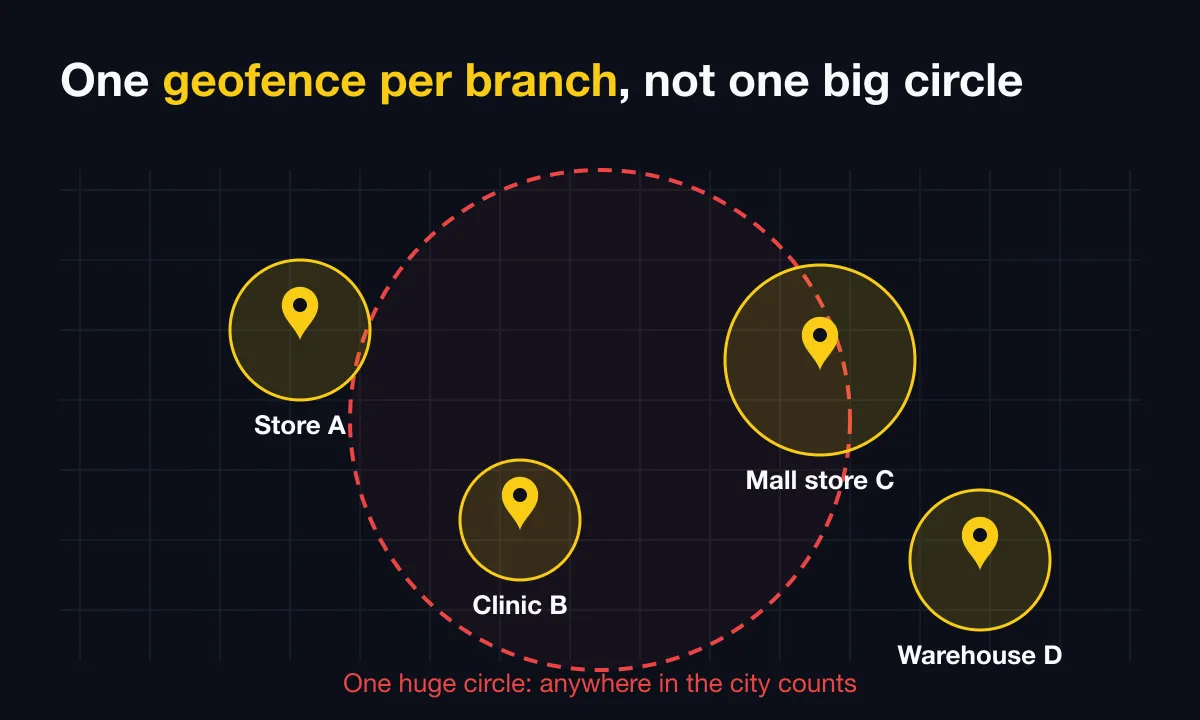
Name sites the way staff talk about them: “Downtown Main St”, “North Warehouse”. Radius tables and edge cases are in how to pick a geofence radius.
Staff who work at several locations
In SnapID Mark, members are not pinned to one site. When they open the camera at any site you have set up, it shows Inside with that site’s name, and the Clock in photo records where it was taken. Someone on a split shift can clock in at store A in the morning and take work photos at store B in the afternoon.
Worth knowing: the app cannot yet restrict a person to “store A only”. If you need that rule, check it through photos filtered by site, or write it into your attendance policy.
Per-location reports
- Timesheet: the admin website shows one row per person per day with clock-in, clock-out, hours and status, plus week and month views and an Excel timesheet export.
- By branch: open Photos, filter by site and by type (clock in or clock out) to see who was at that site on a given day. The photo map shows all capture points on one screen.
- Export per branch: after filtering, export Excel, or a ZIP of originals with metadata.csv, to send to the branch manager.
- Template per workplace: each site can use its own stamp template and logo, handy when a group runs several brands.
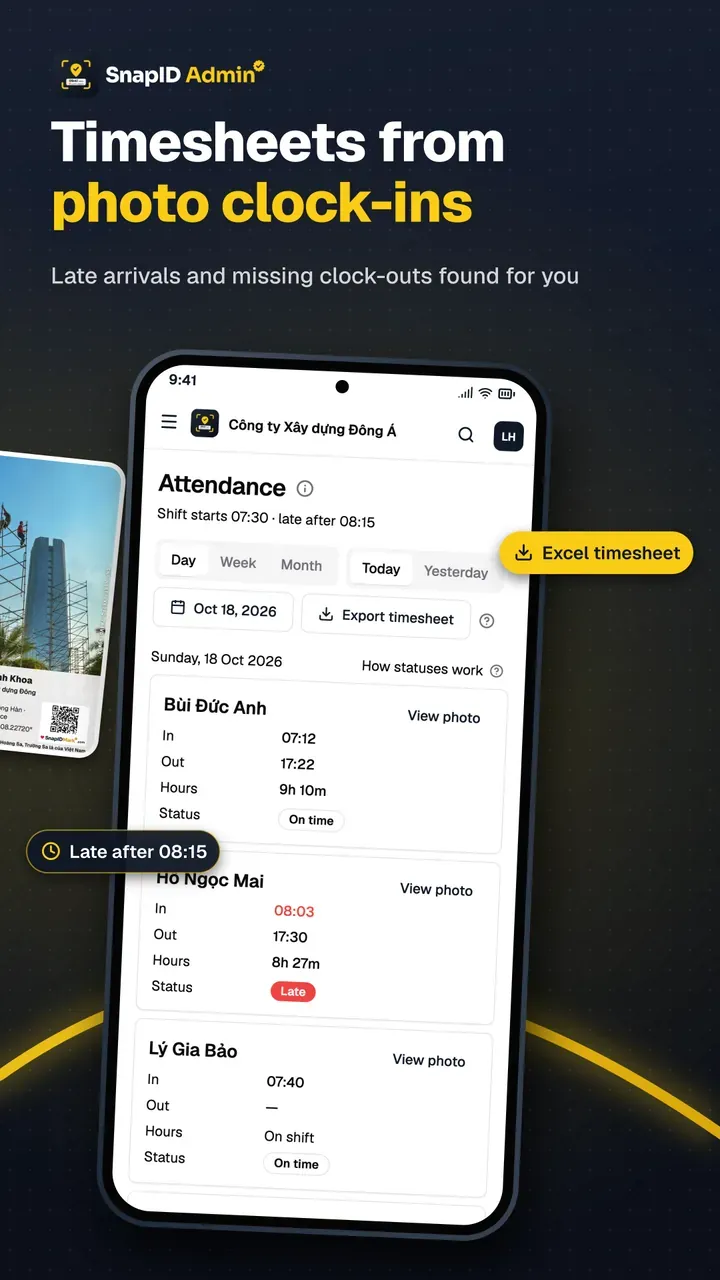
The timesheet is per person and does not yet split hours by site. If you allocate labor cost per store, cross-check with the site filter on photos.
Time zones and different shift times
Shift rules in the Rulebook (shift start, late-after time, work days, time zone) apply to the whole workspace. For a chain in one country with similar opening hours, one set of rules is enough, and small differences can be handled when you review the timesheet.
If branches are in different time zones or run very different shifts, the simplest setup is a separate workspace for each group. One account can belong to several workspaces and switch between them from the camera, so a head office manager still sees both.
Regional managers and roles
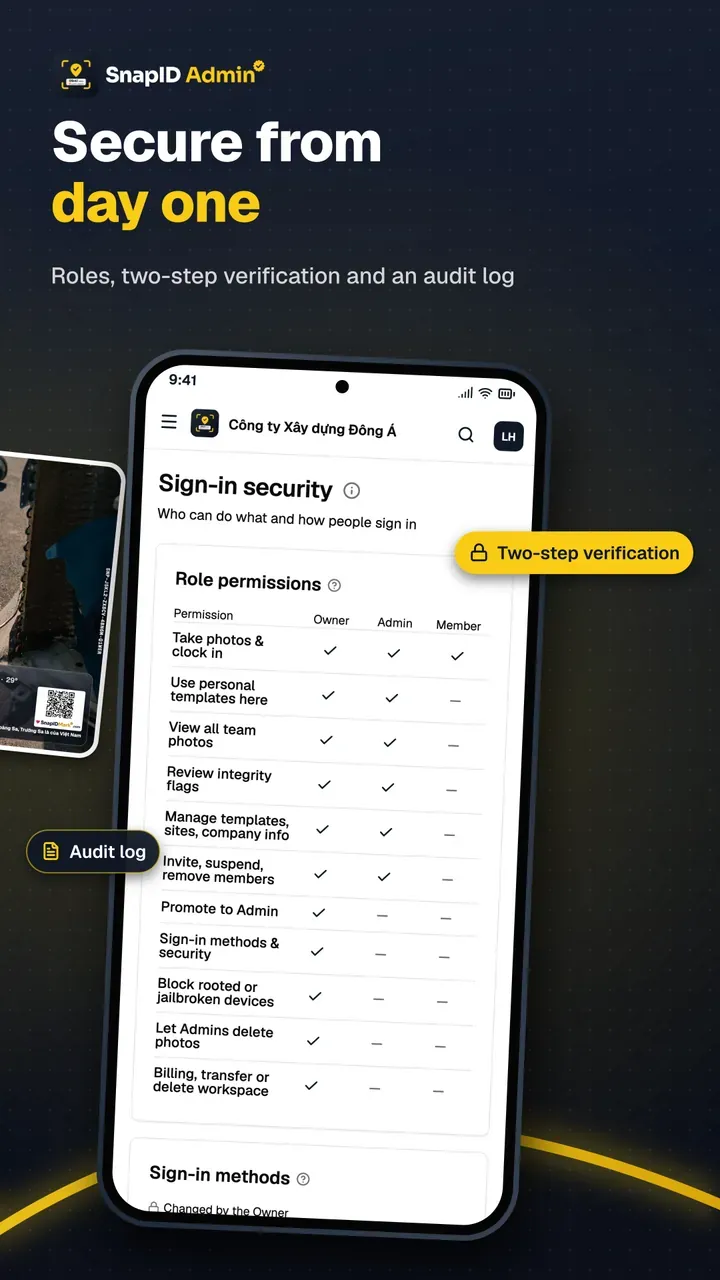
SnapID Mark has three roles: Owner, Admin and Member. Admins see all photos and attendance in the workspace. There is no branch-limited Admin yet. Chains with 3 to 10 sites often make regional managers Admins of the whole workspace. If regions must not see each other’s data, use one workspace per region. See roles.
Roll out branch by branch
- Pick a pilot branch. One with a willing manager, ideally including a “hard” spot such as a mall store.
- Add the site and rules. On the admin website, add the site and radius, then set shift times in the Rulebook.
- Invite that branch’s staff. Use a code, link or CSV. Every workspace includes 5 free seats, enough for a small store.
- Run it for a week. Be there for the first Clock in and widen the radius if people get blocked by mistake.
- Expand. Add one or two branches a week. Past 5 people, pick a 10, 25, 50 or 100-seat business plan, see pricing.
The full first-team playbook is in the photo clock-in rollout guide. For staff new to the idea, share how to clock in with a phone app.
What SnapID Mark does not have
- No scheduling, payroll or leave management.
- No Wi-Fi, QR or face clock-in, and no shared kiosk in the store.
- No way yet to pin staff to one branch, and no branch-limited Admin role.
- No total-hours report per site yet.
- No API, integrations or SSO.
FAQ
Do I need a time clock at every branch?
Not necessarily. With a GPS photo attendance app, staff use their phones and each branch is simply a site on the admin website. Locations where many people arrive at once may still suit a fixed device.
How does someone who works at two branches in one day clock in?
They clock in where they start and clock out where they finish. Each photo records the site, time and coordinates, so the manager can see where they were.
How many locations can one workspace have?
You can create many sites in one workspace, each with its own radius. When a job site closes, archive it to keep the list tidy.
Can branches in other countries share one workspace?
Shift rules and the time zone are set for the whole workspace, so branches in another time zone should get their own workspace. The app is available in 19 languages, and stamp labels follow the photographer’s language.
Are staff tracked while they travel between branches?
No. SnapID Mark reads location only while the app is open to take a photo or clock in. There is no all-day tracking.
Get started
Download SnapID Mark from the App Store or Google Play, then create your workspace and first branch on the admin website. Choosing a system for the whole chain? Read employee attendance management software.
MISA AMIS, Tanca, Base, Timemark and other app names in this article are trademarks of their respective owners and are used for descriptive purposes only. Information about other apps is based on their official pages as of October 2026 and may have changed.