
Base Checkin Alternative for Field Teams in Vietnam
Base Checkin and Base HRM cover office attendance, shifts and payroll. When field teams need a Base Checkin alternative or add-on with verifiable photos.
If you run a foreign-owned company in Vietnam, your local HR team may already use Base.vn, a well-known Vietnamese platform for work, HR and payroll. Office attendance usually works well. The gap shows up with people who work away from the office: technicians, site supervisors, cleaning crews, merchandisers. A manager sees “checked in at 7:58” but cannot see where that person stood, what the work looked like, or prove any of it to a client.
This guide compares Base Checkin (and the Base HRM attendance app) with SnapID Mark. We make SnapID Mark, so we say plainly where Base is stronger and what SnapID Mark does not do. You can pick one, or split the work between both.
Quick verdict
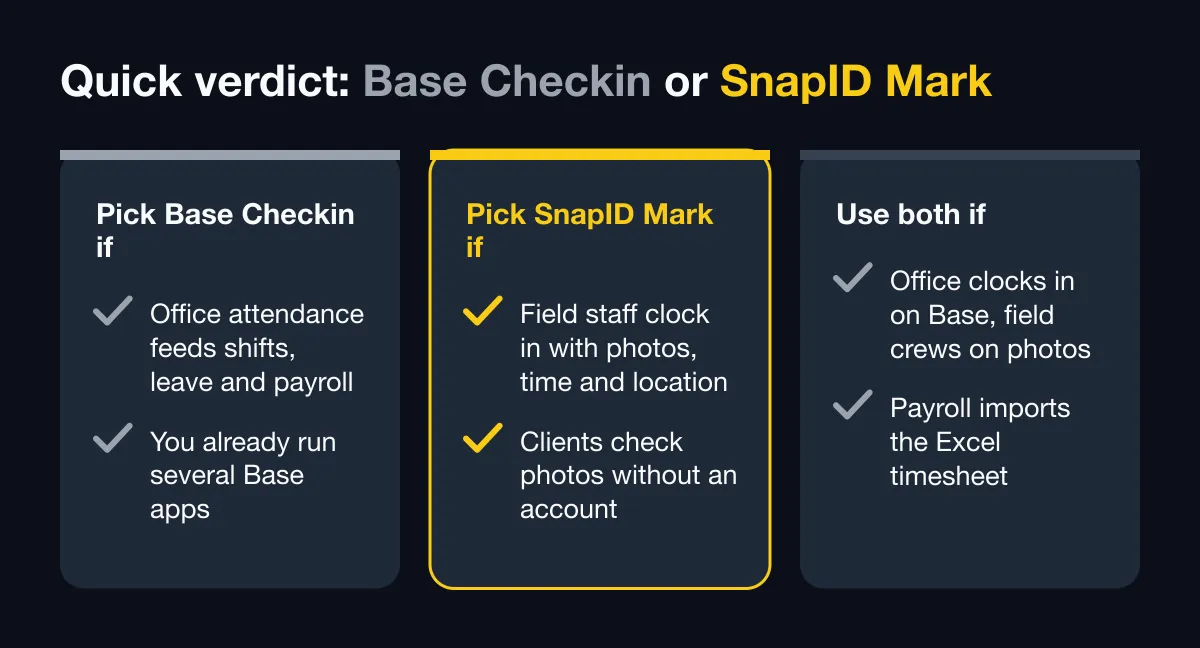
| Situation | Pick |
|---|---|
| Office attendance must feed shifts, leave and payroll in one system | Base HRM with Base Checkin |
| You already run several Base apps (such as Schedule and Payroll) and want one data source | Base HRM with Base Checkin |
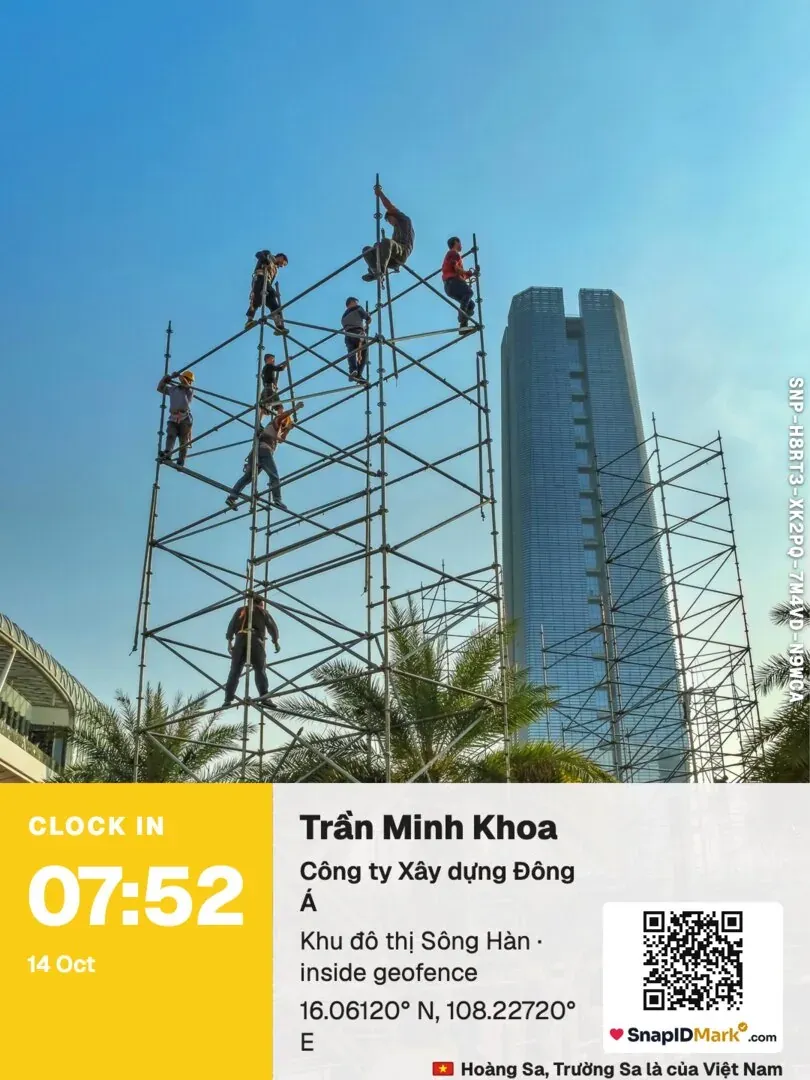
| Field staff need Clock in and Clock out photos with trusted time, location and a verification code | SnapID Mark |
| Clients or project owners must check photos themselves without an account | SnapID Mark |
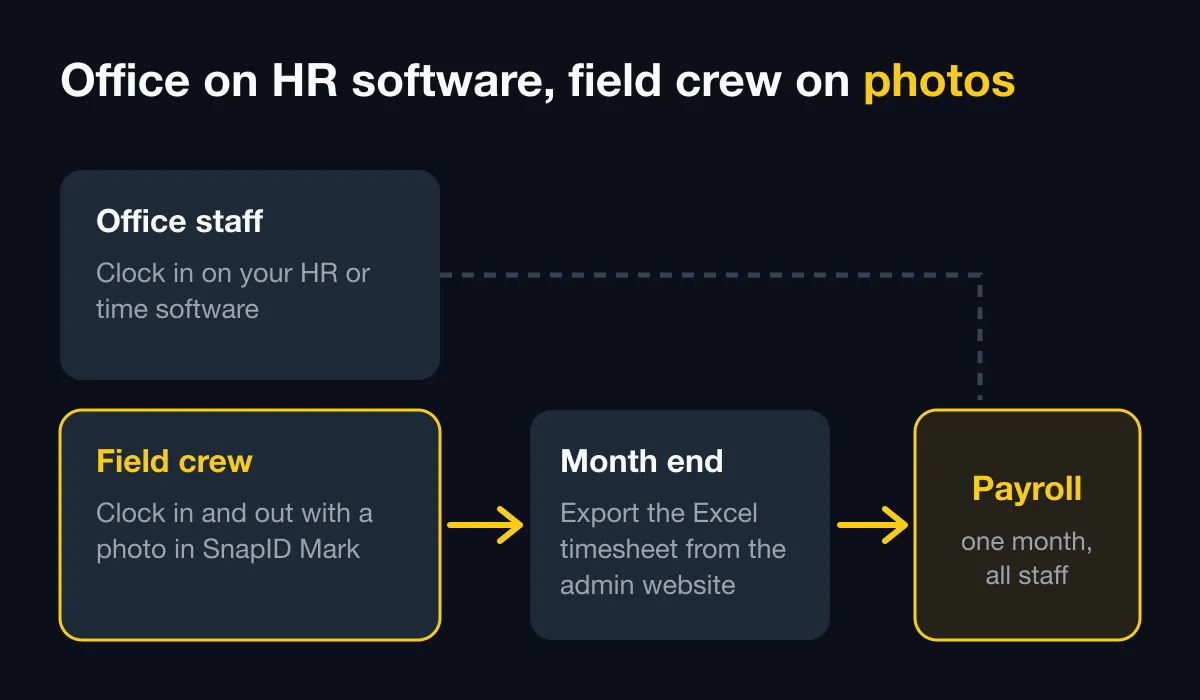
| The office clocks in on Base, field crews also need photo proof of work | Use both, export the SnapID Mark Excel timesheet for payroll |
What Base Checkin and Base HRM do well
First, the product names, because they confuse many buyers. According to base.vn and the Base help center (help.base.vn) as of October 2026:
- Base Checkin is an app in the Base HRM+ suite for storing and managing attendance data. It collects clock-in logs from several “clients”: mobile phones, Base Vision (face-recognition attendance) and attendance machines. The Base Checkin page does not describe a separate mobile app called “Base Checkin”.
- Mobile clock-in is configured in Base HRM. Base’s install guide says companies that clock in by location or face recognition should also install the Base HRM app (the help center also calls the employee app Base Me).
- When an admin adds a mobile clock-in client to an office, they can restrict it to the company’s static IP range, verify location against coordinates picked on a map, choose GPS only or GPS plus AGPS, require face detection in the image, require approval by a named person, and accept only staff from that office or on selected schedules.
- Web clock-in is also available, restricted by office IP.
- Base Checkin shows logs for the whole company and for each person, with on-time and late status. Employees submit correction requests that managers approve or reject. Data can be imported, and Checkin connects to timesheets in Base HRM.
- Around it sit separate apps: Base Schedule (shifts and workdays), Base Timeoff and Base Overtime, and Base Payroll.
In short, Base is a full HR suite. If you need attendance that flows straight into shifts, leave and payroll for the whole company, Base does that better than SnapID Mark, which has no payroll or leave management.
Some things are not described on their official pages: mock-location detection, offline clock-in, a specific geofence radius, and a way for people outside the company to verify attendance photos. The Base Checkin page offers a demo rather than public prices, so check their pricing page or ask their sales team.
When field teams need something else
- You need a photo as proof, not just a log line. A Clock in photo at the site, before and after shots, handover photos, each with time and location printed on the image.
- Outsiders must check the evidence themselves. Building managers, project owners and clients want to know a photo is the original and when it was taken, without logging into your HR system.
- Work sites change constantly. Each project or store is its own geofence, not an office with a fixed IP.
- Signal is patchy. Basements, industrial parks, rural sites.
- Your Vietnam team is small. Payroll is still done in Excel by an outsourced accountant who just needs a reliable timesheet.
Feature comparison
| Criterion | Base Checkin / Base HRM (per official pages) | SnapID Mark |
|---|---|---|
| Scope | HR suite: attendance, shifts, leave, overtime, payroll | Timestamp camera, photo attendance, photo verification |
| Clock-in methods | Phone (location, face), web by IP, Base Vision, attendance machines | Clock in and Clock out photos on each person’s own phone |
| Allowed area | Office coordinates, IP restriction | Geofence of 20 m to 50 km per site, optional inside-only clock-in |
| Time on the record | Not described | Synced with SnapID servers; changing the phone clock does not change it |
| Time, location, weather, logo on the photo | Not described | Yes, plus notes and custom fields such as a job code |
| Work photos during the day | Not the focus | Yes, same camera as attendance |
| Outside verification | Not described | SnapID code, QR, verify page without an account, SHA-256 file check |
| Mock-location apps | Not described | Workspaces block capture while one is on; rooted devices flagged |
| No signal | Not described | Correct time recorded, sent when back online |
| Corrections | Employee requests, manager approves | Owner or Admin enters manually, with a change log |
| Shifts, leave, payroll | Yes, via Schedule, Timeoff, Payroll | No |
| Reports | Timesheets in Base HRM | Excel timesheet, ZIP of originals, PDF report on the admin website |
| Languages | Product pages in Vietnamese | 19 languages, including English and Vietnamese |
| Pricing | Check their pricing page or ask sales | 5 free seats per workspace, business plans of 10, 25, 50 or 100 seats |
Trusted time and location
With Base, mobile clock-in is checked against the office location and can include face detection. With SnapID Mark, every Clock in is a photo. The time comes from SnapID servers, so changing the phone clock does nothing. Coordinates, GPS accuracy and the full address are printed on the photo. Photos taken outside the geofence, with clock drift or sent late are flagged for Owner or Admin review. See how to stop attendance fraud.
Photos outsiders can verify
This is the biggest difference. Each SnapID Mark photo carries a SnapID code (SNP-XXXXX-XXXXX-XXXXX-XXXXX) and a QR code. Anyone can scan the QR or enter the code on the verify page, with no account, and see the capture time, a rounded area, the workspace and any integrity flags. They can also pick a file and compare its SHA-256 fingerprint with the original inside the browser. See QR photo verification. Note that this is not a legally certified timestamp.
Privacy
SnapID Mark reads location only while the app is open to take a photo or clock in. No all-day GPS tracking and no background tracking. Personal photos stay on the phone. Workspace photos are visible to that workspace’s Owner and Admins.
Language for mixed teams
Base’s product pages are in Vietnamese. SnapID Mark runs in 19 languages, and stamp labels follow the photographer’s language, so a Vietnamese crew and an English-speaking project manager each see the app in their own language.
What SnapID Mark does not have
- No payroll, no shift scheduling, no leave or overtime management.
- No Wi-Fi, IP, QR or face-recognition clock-in, and no attendance machine connection.
- No shared kiosk. Each person uses their own phone and account.
- No API or integration with Base or other HR software yet, and no SSO.
- No employee correction-request workflow. An Owner or Admin edits entries on the admin website.
Who should pick which
- Keep Base, skip SnapID Mark: most staff work in an office, attendance must flow into payroll, and nobody outside needs to see photos.
- Pick SnapID Mark: a small team working across many sites that needs photo proof and an Excel timesheet, not a full HR system.
- Use both: the office keeps clocking in on Base. Field crews Clock in and Clock out with photos in SnapID Mark and shoot work photos during the day. At month end, payroll imports the SnapID Mark Excel timesheet. The split is covered in HR software vs a photo attendance app.
Comparing several Vietnamese HR suites? Also read the 1Office attendance alternative and the MISA AMIS attendance alternative.
Run a one-week side-by-side trial
- Create a workspace on the admin website. New workspaces are approved by the SnapID team and no payment card is needed. See Create a workspace.
- Add your sites and geofence radius. See geofence attendance radius.
- Set shift start, late-after time and work days in the rulebook. See Rulebook.
- Invite 3 to 5 field staff by code or link. See Invite members.
- Have them Clock in and Clock out with photos alongside Base for a week. See Photo attendance.
- Export the Excel timesheet and compare it with Base Checkin logs. See Export data.
FAQ
Is Base Checkin a separate mobile app?
According to Base’s official pages as of October 2026, Base Checkin is the attendance data app in the Base HRM+ suite. Staff clock in on their phones through the Base HRM app, while Base Checkin collects logs from phones, Base Vision and attendance machines.
Can SnapID Mark fully replace Base HRM?
No, if you need shifts, leave, overtime and payroll. SnapID Mark replaces field clock-in and adds photo proof that others can verify.
Does SnapID Mark data flow into Base automatically?
Not yet. SnapID Mark has no API or integrations. Export the Excel timesheet from the admin website and import it into your payroll system.
Can staff clock in without a signal?
Yes. The Clock in photo records trusted time offline, waits in a queue on the phone and is sent when the connection returns. See Offline use.
How does pricing compare?
Every SnapID Mark workspace includes 5 free seats, then business plans of 10, 25, 50 or 100 seats; see prices in the app or on the pricing section. For Base, check their pricing page or ask their sales team.
Get started
Download SnapID Mark and open the admin website to create a workspace, or install it from the App Store or Google Play. Comparing more time clocks? Read the Tanca alternative, photo attendance apps compared and face recognition vs GPS photo attendance.
Base, Base.vn, Base Checkin, Base HRM and other app names in this article are trademarks of their respective owners and are used for descriptive purposes only. Information about other apps is based on their official pages as of October 2026 and may have changed.