
Tanca Alternative When You Only Need Photo Attendance
Tanca covers attendance, scheduling and payroll. When a small business is better off with a lighter photo attendance app, or with both tools side by side.
Tanca is a familiar name in Vietnam for mobile attendance. It is a fairly complete HR system, from clock-ins to scheduling and payroll. Not every business needs the whole suite though. Some teams just need to know staff reached the right place on time, with a photo as proof.
This guide compares Tanca and SnapID Mark fairly so you can pick the right tool, or use both.
What Tanca does
According to Tanca’s feature page and user guide as of the publish date:
- Mobile clock-ins by GPS (within a radius of the check-in point, verified against Google Maps), office Wi-Fi, a QR code per location and Face ID (a selfie matched to the profile photo). There is also an AI camera that recognises faces at the entrance.
- The user guide suggests a GPS radius of around 500 to 1000 m and, for high-rise buildings, turning on the feature that sends both an image and GPS to verify position.
- Tanca alerts managers to location-spoofing risks during clock-in.
- Hourly and daily timesheets, overtime, late arrivals and early leaves, night-shift premiums and custom formulas. Attendance flows into payroll. Scheduling is a separate module.
- A 14-day free trial. The feature page does not list a permanent free plan.
If you need a complete HR system with payroll, scheduling and leave, Tanca or similar HR software is the right call.
When a photo attendance app is enough
- A small team without automated payroll. The accountant still runs payroll in Excel and just needs a trustworthy timesheet.
- Work spread across many sites or buildings. You want an on-site photo as proof, not just a tick that says “clocked in”.
- You need work photos during the day. Before and after shots, handover photos, delivery photos, from the same camera used for attendance.
- Clients should check photos themselves. For example, a cleaning company sending shift photos to building management.
- You would rather not collect face data. Face recognition is biometric data and needs careful handling.
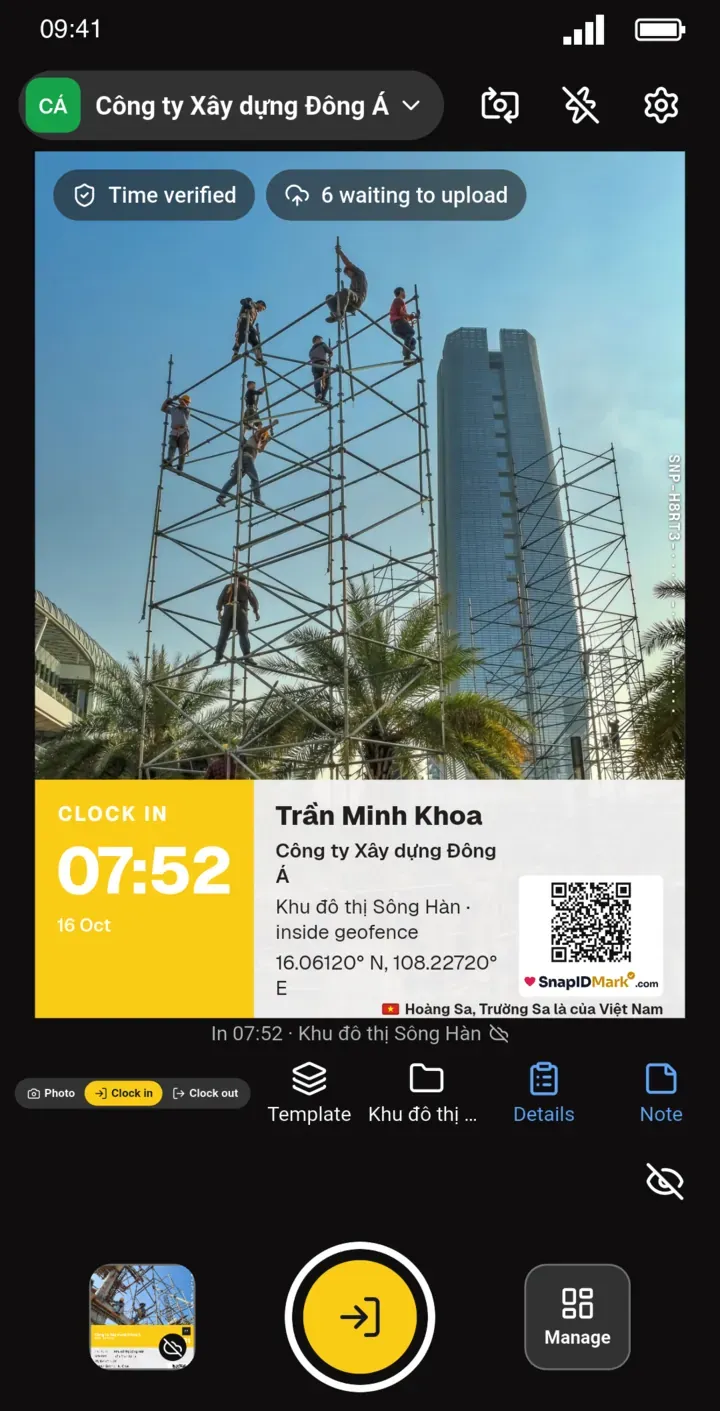
Criteria comparison
| Criterion | Tanca (per its official pages) | SnapID Mark |
|---|---|---|
| Scope | Attendance, scheduling, leave, payroll | Photo attendance, work photos, photo verification |
| Clock-in method | GPS, Wi-Fi, QR, face, AI camera | Clock in and Clock out photos with trusted time and GPS |
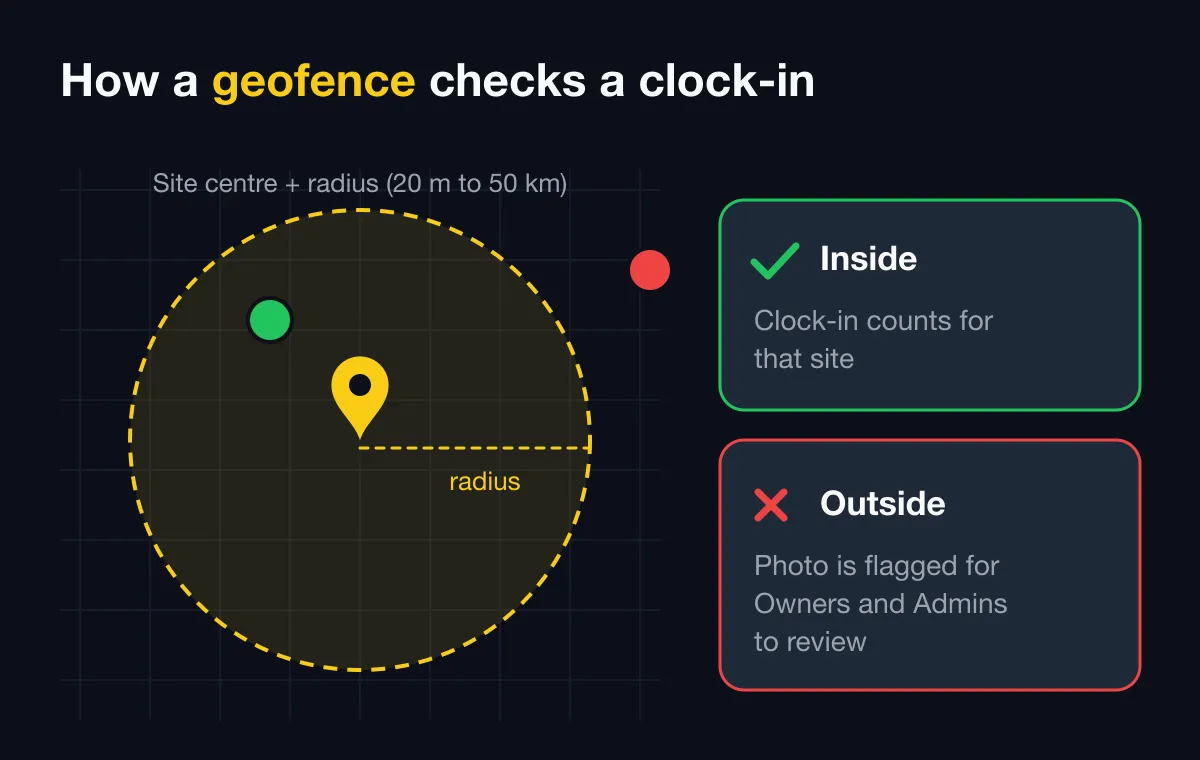
| Allowed zone | Radius around the check-in point | Geofence 20 m to 50 km, optional block outside |
| Fake location | Alerts managers | Blocks capture in workspaces, flags rooted phones |
| Photo as proof | Optional image with GPS | Every clock-in is a stamped photo with SnapID code and QR |
| Work photos during the day | Not the focus | Yes, same camera |
| Verification for outsiders | Not described | Public verify page, SHA-256 file check |
| Timesheets | Several timesheet types, custom formulas | Excel timesheet by date range, daily status |
| Payroll | Yes | No |
| Cost | 14-day trial | Free up to 5 people, 10, 25, 50 and 100 seat plans |
What SnapID Mark does not have
- No payroll, scheduling, leave or overtime requests.
- No Wi-Fi, QR or face recognition clock-ins.
- No connection to attendance machines or AI cameras.
- No API or HR system integrations yet.
- No SSO.
Using both
A model many companies choose:
- Office: clock in with the existing HR software tied to payroll.
- Field crew: clock in and out with photos in SnapID Mark on site, plus work photos during the day.
- Month end: the accountant exports the Excel timesheet from the admin website and imports it into payroll.
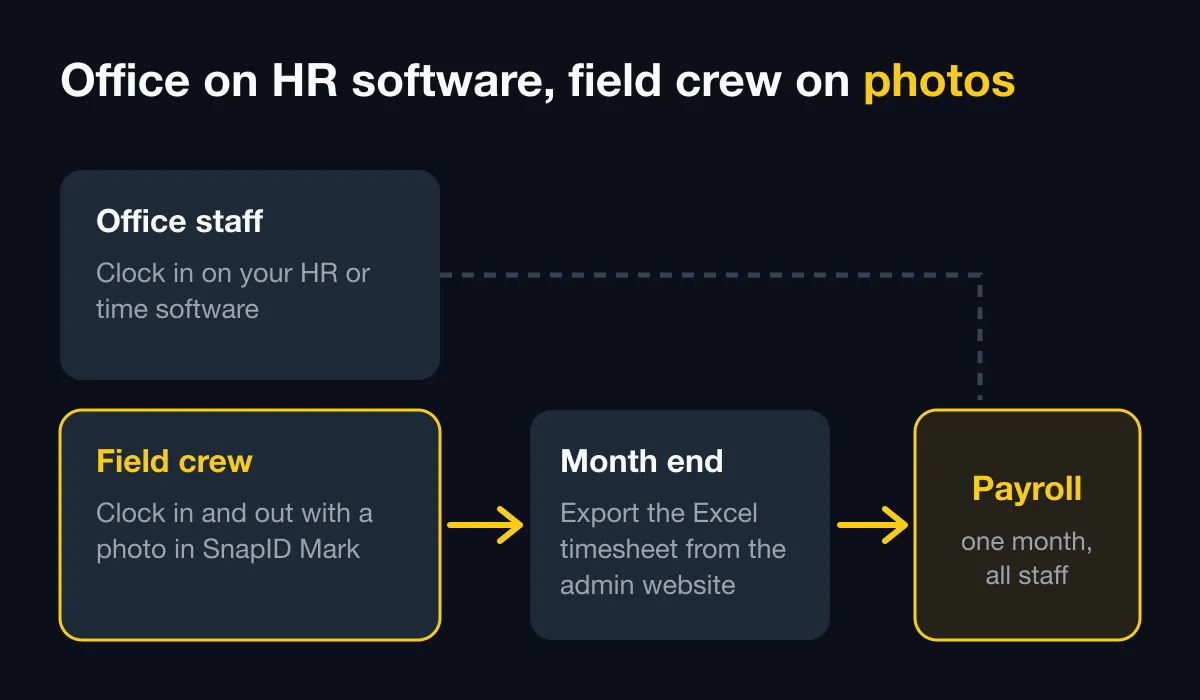
The split is covered in detail in HR software vs a photo attendance app.
A one-week trial
- Add your work sites and their radius. See geofence attendance radius.
- Set the shift start and the late threshold.
- Invite staff by code, link or CSV. See Invite members.
- Show them the Photo, Clock in and Clock out modes. See Photo attendance.
- Write a short policy for staff. See how to write a photo attendance policy.
Further reading:
- A similar comparison with another HR suite is in the MISA AMIS attendance alternative.
- Choosing a system for many branches? Multi-location attendance compares the options by business model.
- If your HR team runs on Base.vn, see the Base Checkin alternative for how photo attendance fits alongside it.
- Evaluating 1Office too? Read the 1Office attendance alternative.
FAQ
Can SnapID Mark fully replace HR software?
No, not if you need payroll, scheduling or leave. SnapID Mark replaces on-site clock-ins and adds photo proof.
What if someone forgets to clock out?
An Owner or Admin enters a manual clock-out time on the admin website. Important changes are recorded in the audit log.
Can staff in a basement with no signal clock in?
Yes. The clock-in photo records the real capture time and uploads when the connection returns. See Taking photos offline.
Get started
Download SnapID Mark and create a free 5-seat workspace on the admin website. More comparisons in photo attendance apps compared.
Tanca and other app names are trademarks of their respective owners and are used for descriptive purposes only. Information about other apps is based on their official pages as of the publish date and may have changed.