
Lark Attendance vs Photo Attendance for Field Teams
Lark Attendance offers GPS, Wi-Fi and selfie clock-ins, shifts and leave. A summary from Lark's own pages, and when field teams also need site photos.
Many companies already use Lark for chat, meetings, docs and Lark Base spreadsheets. When attendance comes up, the natural question is: can we just use Lark Attendance, and what is missing for people who work in the field?
This guide uses only information from Lark’s official pages (larksuite.com) as of the publish date. We make SnapID Mark, so we say plainly where Lark is the better fit.
What Lark Attendance does
According to articles on Lark’s official site:
- Employees clock in and out on mobile or desktop, on site or remote. There is a one-tap express mode.
- Admins set GPS or Wi-Fi rules so punches only come from approved places or networks.
- Depending on the attendance group settings, employees may take a selfie at clock-in to confirm identity. The photo stays linked to the record.
- Admins set shifts, standard hours, breaks, overtime rules and holiday calendars by department. Late arrivals and early departures are flagged.
- Employees submit leave requests and corrections for missed punches through an approval flow.
- Reminders for missed clock-ins, daily summaries, and analysis in Lark Base.
Lark is also a full workplace suite with chat, video meetings, docs and calendar, and its website is available in Vietnamese. Lark offers a free plan, but check the pricing page for user limits and which plans include Attendance.
If your company already works in Lark and mostly needs shifts, leave and overtime, Lark Attendance is the natural choice.
Attendance and site photos are different jobs
Attendance answers who came to work, and when. Field teams also need to show what was done, where, and what it looked like: handover photos, before and after shots, delivery photos, store visit photos. These often go outside the company, to owners, clients or insurers.

That makes a few things matter:
- Time and location printed on the photo, not only stored inside an internal system.
- Recipients can check the photo themselves without a Lark account.
- The time doesn’t follow the phone clock, even when the photo is taken offline.
- Photos grouped by project, site and work item for reports.
The official Lark pages we reviewed do not describe these points. That is where SnapID Mark focuses.
Quick comparison
| Criterion | Lark (per its official pages) | SnapID Mark |
|---|---|---|
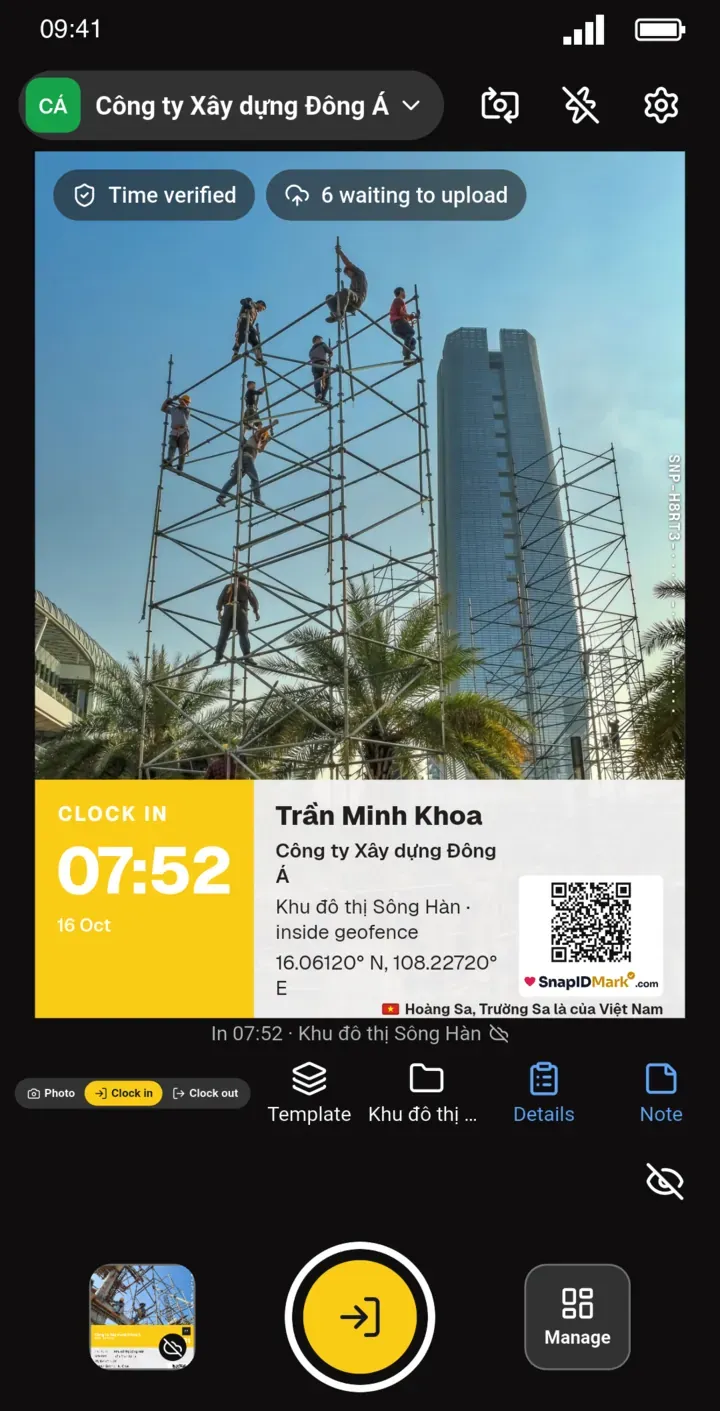
| Clock-in | Mobile and desktop | Mobile only, with Clock in and Clock out photos |
| Location check | GPS or Wi-Fi rules | GPS geofence 20 m to 50 km, no Wi-Fi |
| Photo at clock-in | Selfie, depending on settings | Photo required, front or rear camera, selfie not required |
| Shifts, overtime, leave | Yes | Start time and late threshold only, no leave requests |
| Work photos stamped with time, address, logo | Not described | Yes |
| Outsiders verify a photo | Not described | SnapID code, QR, verify page without an account |
| Fake location | Not described | Workspaces block capture while a mock-location app is on |
| Chat, docs, meetings | Yes | No |
| Exports | Lark Base, reports | Excel timesheet, photos as ZIP, Excel, PDF |
Using Lark with SnapID Mark
A simple split:
- Lark: shifts, leave, overtime, office attendance and internal communication.
- SnapID Mark: field photos with a verification code, plus photo clock-ins for people who need on-site proof.
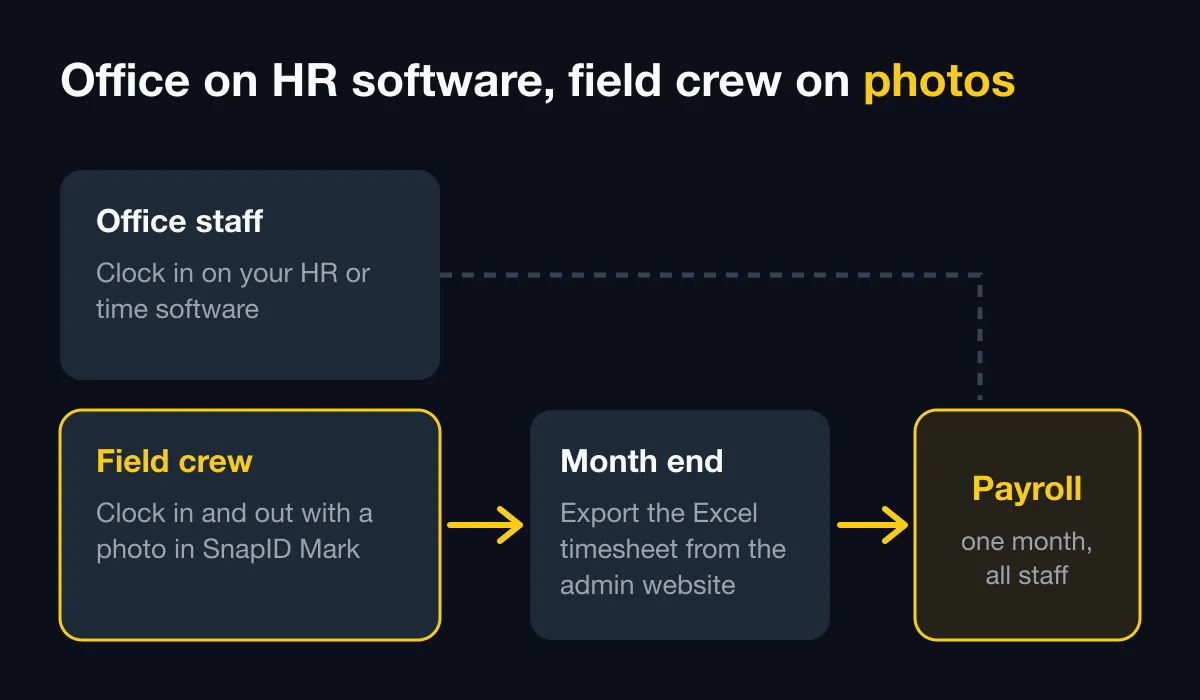
At month end, export the Excel timesheet from SnapID Mark and import it into Lark Base or your payroll sheet. There is no automatic connection between the two, so this is a file step. See Export data.
What SnapID Mark does not have
- No rotating shifts, leave requests, overtime rules or payroll.
- No Wi-Fi or face recognition clock-in, no desktop clock-in.
- No API or integration with Lark or other tools yet, no SSO.
- A SnapID code is not a legally certified timestamp. See are timestamped photos valid evidence.
FAQ
Is the Lark selfie clock-in face recognition?
The pages we reviewed describe a selfie to confirm identity and do not say whether faces are matched automatically. Ask Lark if this matters to you. The trade-offs are covered in face recognition vs GPS photo attendance.
Does SnapID Mark track location all day?
No. Location is read only while the app is open to take a photo. See Phone permissions.
Can the company control which photo templates staff use?
Yes. Admins set required stamp templates, and members can only shoot with those. See Stamp templates.
Get started
Download SnapID Mark and create a workspace on the admin website. Read more in HR software vs a photo attendance app and attendance methods compared.
Lark and other product names in this article are trademarks of their respective owners and are used for descriptive purposes only. Information about Lark is based on its official pages as of the publish date and may have changed.