
ClockShark Alternative: Photo Clock-Ins With GPS and Geofence
ClockShark alternative for construction crews: GPS time tracking, geofence, job costing and photo proof compared, what SnapID Mark lacks, and a trial plan.
ClockShark is a time tracking app built for construction and field service companies. Crews clock in to a job and a task, the office sees who is working where, and the hours flow into payroll and job costing. If that is what you need, it is a strong fit. But some contractors search for a ClockShark alternative because their real problem is different: they need to prove a crew was on site, and they want photos of the work that owners and clients can check themselves.
This guide compares the two fairly. We make SnapID Mark, so we say plainly where ClockShark is the better tool.
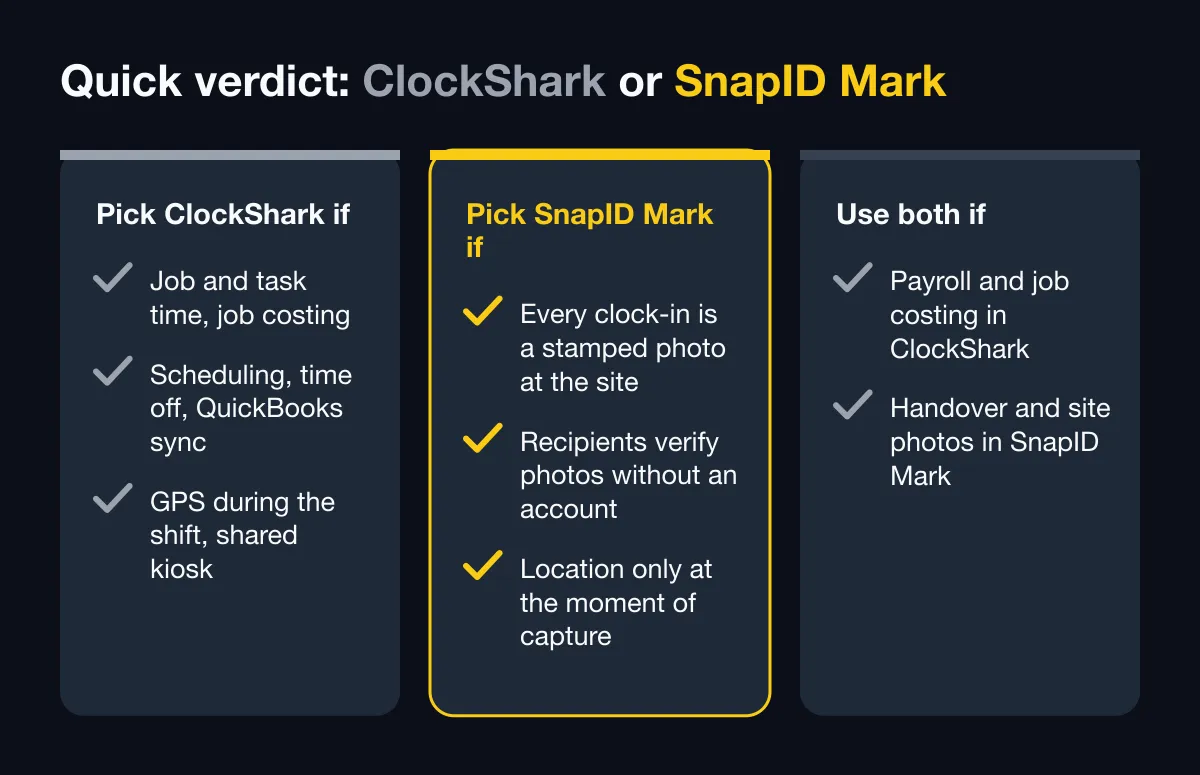
Quick verdict
| Pick ClockShark if… | Pick SnapID Mark if… | Use both if… |
|---|---|---|
| You bill and pay by job and task, and need job costing | You need every clock-in to be a stamped photo at the site | Payroll and job costing live in ClockShark |
| You want scheduling, time off and QuickBooks sync in one app | Clients, owners or insurers must verify photos without an account | Field photos and handover proof need a verifiable code |
| You want GPS breadcrumbs during the shift | You prefer location only at the moment of capture | You want a lighter photo app for subcontractors |
| Crews share one tablet on site (kiosk) | Your crew works in Vietnamese or one of 19 languages |
What ClockShark does well
According to ClockShark’s official website and its App Store listings as of October 2026:
- Job and task time tracking. Workers pick a job and a task before they clock in, switch tasks during the day and log breaks. A Crew Clock lets a foreman clock in a whole team.
- GPS while on the clock. Location is shared with the employer only while the worker is clocked in. The office sees a map of who is working now, and the GPS tour page describes route breadcrumbs recorded at intervals during the shift.
- Geofence reminders. Job sites get a virtual boundary, and the app reminds workers to clock in on arrival and clock out when they leave.
- Scheduling and time off. Workers see assigned jobs and shifts, get directions to the job, and request time off in the app.
- Kiosk. A separate kiosk app turns a shared tablet into a time clock with PINs, and its release notes mention facial recognition. The kiosk has an offline mode that syncs later.
- Timesheets with attachments. Notes, photos and files can be added to timesheets.
- Payroll and job costing. The site describes QuickBooks Online and Desktop integration and a job costing view that compares estimates with actual labor cost.
- The app listing names English and Spanish, and the site offers a free 14-day trial. Check their pricing page for current plans.
For a US contractor who runs payroll and job costing off field hours, this is a mature and focused product.
Feature comparison
| Criterion | ClockShark (per its official pages) | SnapID Mark |
|---|---|---|
| Clock in and out on the phone | Yes, by job and task | Yes, each Clock in and Clock out is a stamped photo |
| Geofence | Yes, with arrival and leave reminders | Yes, 20 m to 50 km per site, option to allow clock-in only inside |
| GPS during the shift | Yes, breadcrumbs while clocked in | No. Location is read only while the app is open to take a photo |
| Time source | Not described | Trusted time synced with SnapID servers, changing the phone clock does not change it |
| Fake GPS apps | Not described on their official pages | Workspaces block capture while a mock-location app is on |
| Photo proof of work | Photos attached to timesheets | Every photo carries time, address, coordinates, weather, logo, notes |
| Recipients verify a photo | Not described | SnapID code and QR, verify page without an account, SHA-256 file check |
| Offline | Yes, clock-ins sync later | Yes, trusted time and SnapID codes work offline, photos send when online |
| Scheduling, time off | Yes | No |
| Job costing, payroll | Yes, QuickBooks integration | No, Excel timesheet export only |
| Kiosk on a shared tablet | Yes | No, each person uses their own phone |
| Languages | English and Spanish | 19 languages, including English and Vietnamese |
| Free option | 14-day trial | Free for personal use, 5 free seats in every workspace |
Proof of presence vs a time record
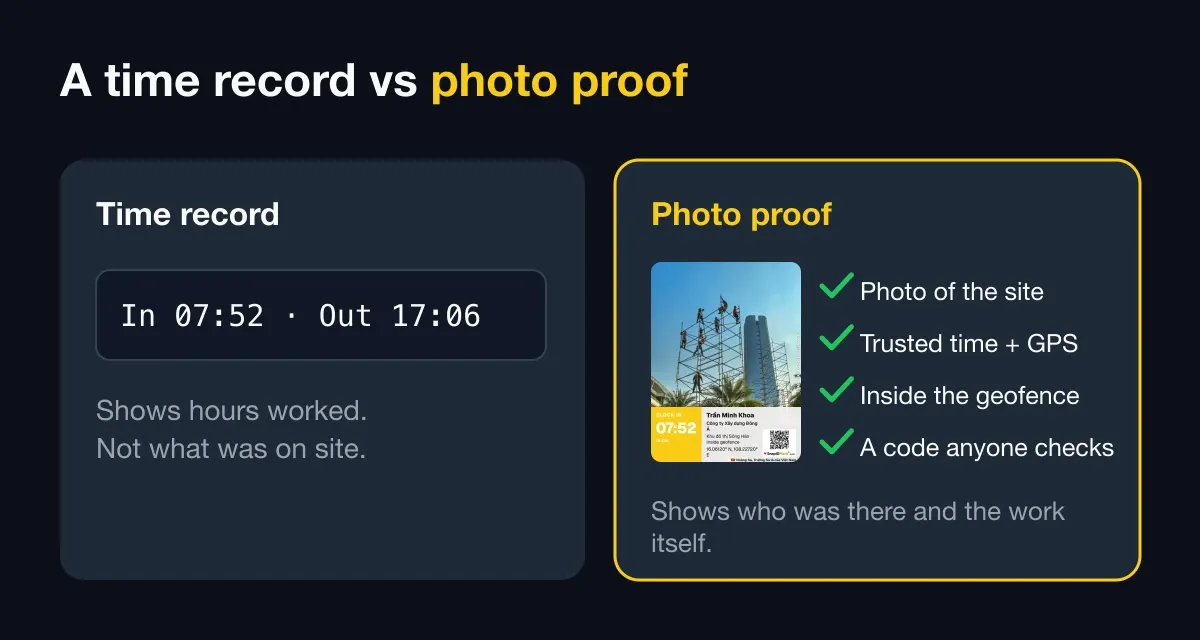
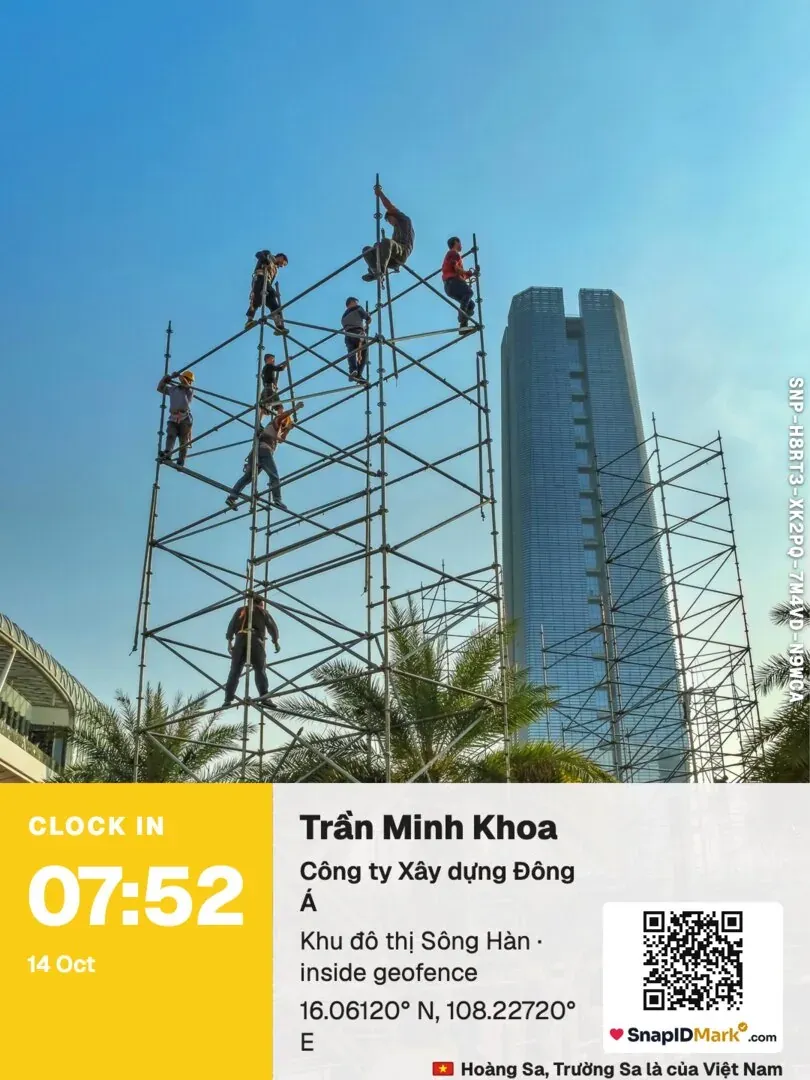
ClockShark answers “how many hours went to which job”. SnapID Mark answers “was this person at this site at 7:30, and can anyone check it”. Each Clock in photo shows the site in the background with a trusted time and GPS stamp. Owners and Admins see flags for clock drift, outside-geofence captures and late uploads on the admin website. See how geofence radius works and trusted time vs phone time.
Location privacy
Some crews push back on GPS tracking during the shift, even when it stops at clock-out. SnapID Mark never tracks location in the background. It reads location only when the app is open to stamp a photo or clock in, and the public verify page shows only a rounded area.
Photos that leave the company
Timesheet photos are for the office. On a construction job, photos often go to the owner, the main contractor or an insurer. A SnapID Mark photo carries a SnapID code and QR code. The recipient opens the verify page, sees the capture time and integrity flags, and can compare the file’s SHA-256 fingerprint with the original in the browser. Read construction photo apps with GPS for more.
What SnapID Mark does not have
- No job and task time tracking, no job costing, no payroll.
- No scheduling, no time off requests, no chat.
- No shared kiosk, no PIN or face clock-in, no Wi-Fi or QR clock-in.
- No GPS breadcrumbs or all-day tracking. This is a design choice, but if you need route history, it is missing.
- No API or integrations yet, and no QuickBooks sync.
- A SnapID code lets others check a photo, but it is not a legally certified timestamp.
Who should pick which
- Choose ClockShark if your hours feed payroll and job costing, crews switch between jobs during the day, and you want scheduling in the same app.
- Choose SnapID Mark if your main risk is buddy punching or disputes about presence, and you want stamped photos as proof for clients. It also fits small crews that start on the free 5 seats.
- Use both if the office already runs payroll on ClockShark. Field staff can use SnapID Mark for handover, inspection and daily progress photos. See construction crew attendance and daily construction photo reports.
If you are also weighing general time trackers, compare our notes on the Hubstaff alternative and the Clockify alternative.
Try it on one site in a week
- Create a workspace on the admin website. New workspaces are approved by the SnapID team, no payment card needed. See Create a workspace.
- Add your job site with a radius and turn on clock-in only inside the geofence in the rulebook. See Rulebook.
- Invite the foreman and 3 or 4 workers by code or link. See Invite members.
- Crews clock in and out with photos for a week. Ask them to take progress photos with the same camera. See Photo attendance.
- Export the Excel timesheet and compare it with your current hours. See Export data.
FAQ
Does SnapID Mark track workers during the shift like ClockShark?
No. SnapID Mark reads location only while the app is open to take a photo or clock in. There is no background tracking or route history.
Can SnapID Mark replace ClockShark for payroll?
Not on its own. It exports an Excel timesheet with on-time, late and hours worked per day, but it has no payroll, job costing or QuickBooks sync. Many teams keep their payroll tool and use SnapID Mark for proof.
Does clock-in work without signal on a remote site?
Yes. Photos are stamped with trusted time and a SnapID code offline. Clock in and Clock out photos wait in a queue on the phone and are sent as soon as there is a connection. See offline photo proof.
What stops a worker from faking the location?
In a workspace, capture is blocked while a mock-location app is on, and rooted or jailbroken devices are flagged. See how to stop attendance fraud.
Is there a free plan?
Personal use is free with ads. Every workspace includes 5 free seats, and business plans of 10, 25, 50 or 100 seats are listed at pricing.
Get started
Download SnapID Mark on the App Store or Google Play, then open the admin website to set up your first site. Comparing more options? Read the Connecteam alternative, the Jibble alternative and our guide to employee attendance management software.
ClockShark, QuickBooks and other app names in this article are trademarks of their respective owners and are used for descriptive purposes only. Information about other apps is based on their official pages as of October 2026 and may have changed.