
Procore Alternative for Small Contractors: Photos and Crew Time
Procore is a full construction platform. A Procore alternative for small contractors who mainly need verifiable site photos and crew attendance, with gaps.
Procore is one of the best-known names in construction software. General contractors, owners and specialty contractors use it to run drawings, RFIs, submittals, schedules and budgets in one place. Small contractors hear about it from bigger partners and wonder whether they need it too, or whether they are really looking for a Procore alternative for small contractors: something that handles daily site photos and crew hours without a long rollout.
We make SnapID Mark, so keep that in mind. We will be clear about where Procore is far ahead. SnapID Mark is not a construction management platform and we will not compare it as one.
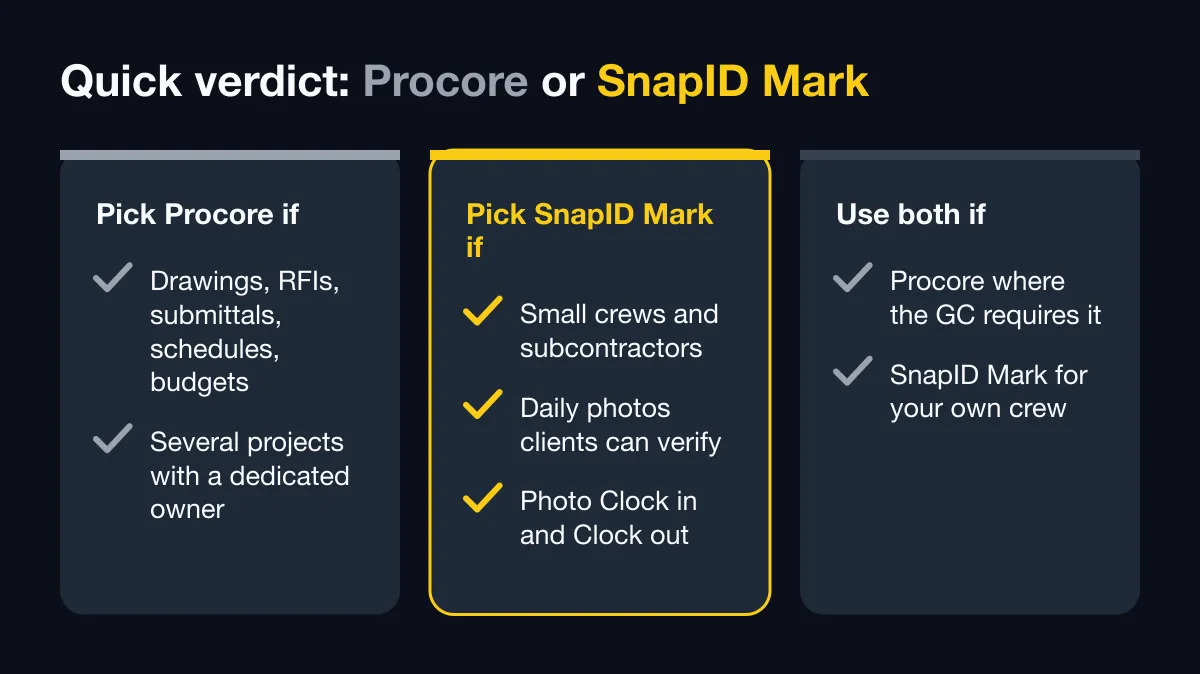
Quick verdict
| Your situation | Better fit |
|---|---|
| You manage drawings, RFIs, submittals, schedules, budgets and change orders across projects | Procore |
| You are a small crew or subcontractor who needs daily photos with trusted time and GPS that clients can verify, plus photo Clock in/Clock out | SnapID Mark |
| Your general contractor uses Procore, but your own crew needs simple photo proof and a timesheet | Use both: Procore where the GC requires it, SnapID Mark for your crew |
What Procore does well
According to Procore’s official site (home, project management and pricing pages) and its App Store listing, as of October 2026:
- Project management: drawings with hyperlinked sheets and a shared current set, RFIs linked to drawings, submittal logs, specifications, punch lists, scheduling with Gantt charts and look-ahead reports.
- Daily logs and timecards: daily logs and timecards with GPS stamps, so the office sees what happened on site.
- Photos and video: field capture with markups, a map view of project photos, and per the App Store listing, GPS, date and direction stamps on photos, 360-degree capture and turning photos into punch items, observations or RFIs.
- Offline: the project management page describes full offline use on remote sites, with changes syncing when the device reconnects.
- Beyond the field: cost management, resource management for crews and equipment, 3D model viewing, AI agents that check specs, drawings and submittals, and an app marketplace listing more than 500 integrations plus an API.
- Pricing model: an annual fee per product based on your Annual Construction Volume, with unlimited users at no extra charge. No free plan or public price is shown; you request a quote. Check their pricing page for details.
- Mobile apps: iOS and Android. The App Store listing says an active Procore subscription is required. Its language list has English and 12 others; Vietnamese is not among them.
For a general contractor running several commercial projects, Procore covers far more ground than any photo app. SnapID Mark does not replace it.
Why small contractors look for something lighter
- Most of the job is photos. Before and after shots, progress photos, handover photos. Drawings and RFIs come from the GC, often as PDFs.
- The client wants to check a photo, not log into a system. A QR code on the photo is easier for a homeowner or a small investor than a guest account.
- Crew attendance is the other daily task. You want workers to Clock in and Clock out with a photo inside the site’s geofence, and an Excel timesheet at month end.
- Pricing by construction volume does not fit. A small firm may prefer a free start and seat-based plans.
- Setup time. A platform with many modules needs someone to configure and train. A camera app works the same afternoon.
- Language. Crews who prefer Vietnamese, or another of SnapID Mark’s 19 languages, get the app and stamp labels in their own language.
Feature comparison
| Criterion | Procore (per official pages) | SnapID Mark |
|---|---|---|
| Drawings, RFIs, submittals, specs | Yes | No |
| Schedules, Gantt, budgets, change orders | Yes | No |
| Daily log | Yes, GPS-stamped | No log builder; PDF photo report from filtered photos |
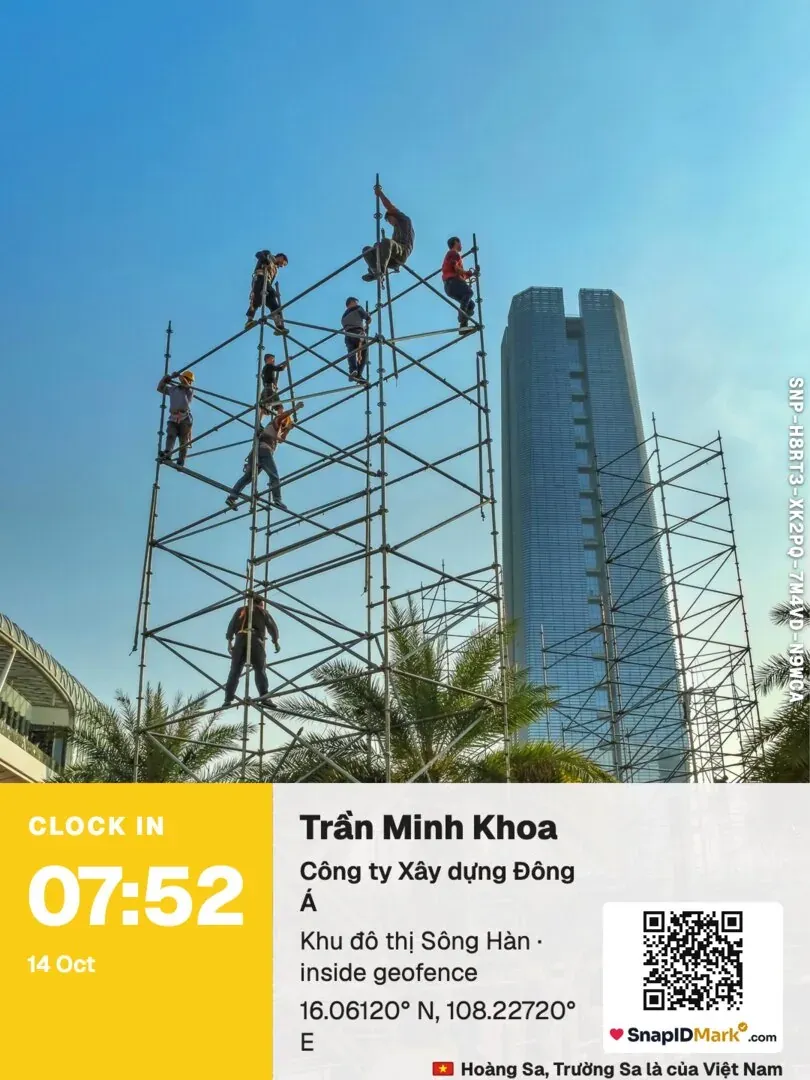
| Photo stamp | GPS, date and direction stamps (App Store) | Trusted time, date, GPS and accuracy, address, weather, mini map, logo, notes, custom fields such as job code |
| Time source | Not described | Synced with SnapID servers; changing the phone clock does not change it |
| Recipient verifies a photo without an account | Not described | SnapID code and QR, verify page, SHA-256 file check in the browser |
| Fake GPS | Not described | Mock-location apps detected; workspaces block capture while one is on |
| Crew time | Timecards, GPS-stamped | Photo Clock in/Clock out, geofence 20 m to 50 km, late and on-time report, Excel timesheet |
| Offline | Yes | Yes, trusted time and SnapID codes work offline |
| Stamped video | Video capture | Stamped video recorded on the phone; the file stays on the phone |
| Integrations, API | 500+ integrations, API | No |
| Users and pricing | Unlimited users, priced by construction volume, quote only | 5 free seats per workspace, plans of 10, 25, 50 or 100 seats |
| Languages | English and 12 others per App Store | 19 languages incl. Vietnamese and English |
In short: Procore manages the project. SnapID Mark proves what happened on site, photo by photo, and records who was there.
Photos a client can check
Each SnapID Mark photo carries a SnapID code (SNP-XXXXX-XXXXX-XXXXX-XXXXX) and a QR code. The client scans it or enters the code at verify.snapidmark.com and sees the capture time, a rounded area, the workspace and integrity flags. If they received the file by chat or email, they can compare its SHA-256 fingerprint with the original in their browser, with no upload. This is useful when a payment depends on progress photos. See construction progress photo report and daily construction photo reports.
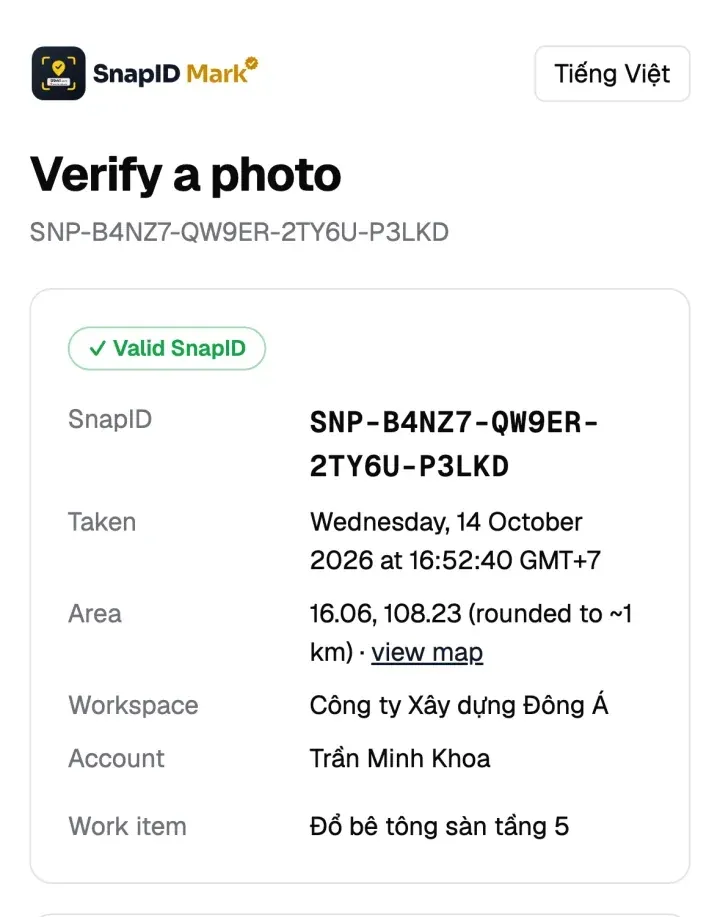
It is not a legally certified timestamp. It gives the client a fast, independent check.
Crew attendance without all-day tracking
Workers clock in with a photo at the site. The app checks the photo against the site’s geofence and the rulebook (shift start, late-after time, work days, break, time zone). Location is read only while the app is open; there is no background tracking. The admin website shows on time, late and hours worked per day, and exports an Excel timesheet. See construction crew attendance.
What SnapID Mark does not have
- No drawings, plans, BIM or 3D models.
- No RFIs, submittals, specs, punch lists or change orders.
- No scheduling, Gantt charts, budgets or cost tracking.
- No daily log builder, forms or checklists.
- No payroll, API, integrations or SSO.
- No legally certified timestamp. See are timestamped photos valid evidence.
Who should pick which
- Pick Procore if you are a general contractor or owner running several projects with drawing sets, RFIs, submittals and budgets, and you have someone to own the setup.
- Pick SnapID Mark if you are a small builder, renovation crew or subcontractor whose daily work is photos and crew hours, and you want to start free.
- Use both if a GC requires Procore on its projects. Your crew can still take verifiable photos and clock in with SnapID Mark, and you upload the photos or share verify links where the GC asks.
Try it on one project
- Create a workspace on the admin website. A new workspace is approved by the SnapID team; no payment card is needed. See Create a workspace.
- Add the site with a geofence radius and set the rulebook. See Rulebook.
- Lock a stamp template with your logo and a job code field. See Template rules.
- Invite the crew by code or link. See Invite members.
- After a week, export the PDF photo report and the Excel timesheet. See Export data.
FAQ
Is there a free version of Procore?
Procore’s pricing page does not show a free plan. It prices by product and Annual Construction Volume, with unlimited users, and asks you to request a quote.
Can SnapID Mark replace Procore?
Not for project management. It has no drawings, RFIs, submittals or budgets. It can replace the photo and crew attendance part for small teams that do not need the rest.
Can my crew use SnapID Mark on a Procore project?
Yes. SnapID Mark works on its own. You can download photos or a ZIP of originals from the admin website and upload them wherever the GC asks.
Does SnapID Mark track workers all day?
No. Location is read only while the app is open to take a photo or clock in.
How much does SnapID Mark cost?
Every workspace includes 5 free seats. For larger crews, business plans of 10, 25, 50 or 100 seats are listed in the app and on the pricing section.
Get started
Download SnapID Mark from the App Store or Google Play, then open the admin website to set up your first site. Related reading: the SafetyCulture alternative, the Raken and Fieldwire alternative and the CompanyCam alternative.
Procore and other app names in this article are trademarks of their respective owners and are used for descriptive purposes only. Information about other apps is based on their official pages as of October 2026 and may have changed.