
SafetyCulture (iAuditor) Alternative for Verifiable Field Photos
SafetyCulture, now Mitti, is a full inspection platform. When a lighter SafetyCulture alternative fits: verifiable photos, photo attendance, honest gaps.
Many teams first meet SafetyCulture under its old name, iAuditor: a checklist app for safety walks, store audits and site inspections. It has grown into a broad operations platform. Small teams often search for a SafetyCulture alternative because they only use one part of it: taking photos on site and proving when and where they were taken.
We make SnapID Mark, so read this with that in mind. We will say plainly where SafetyCulture is stronger, and we will not pretend SnapID Mark is an inspection platform. It is not.
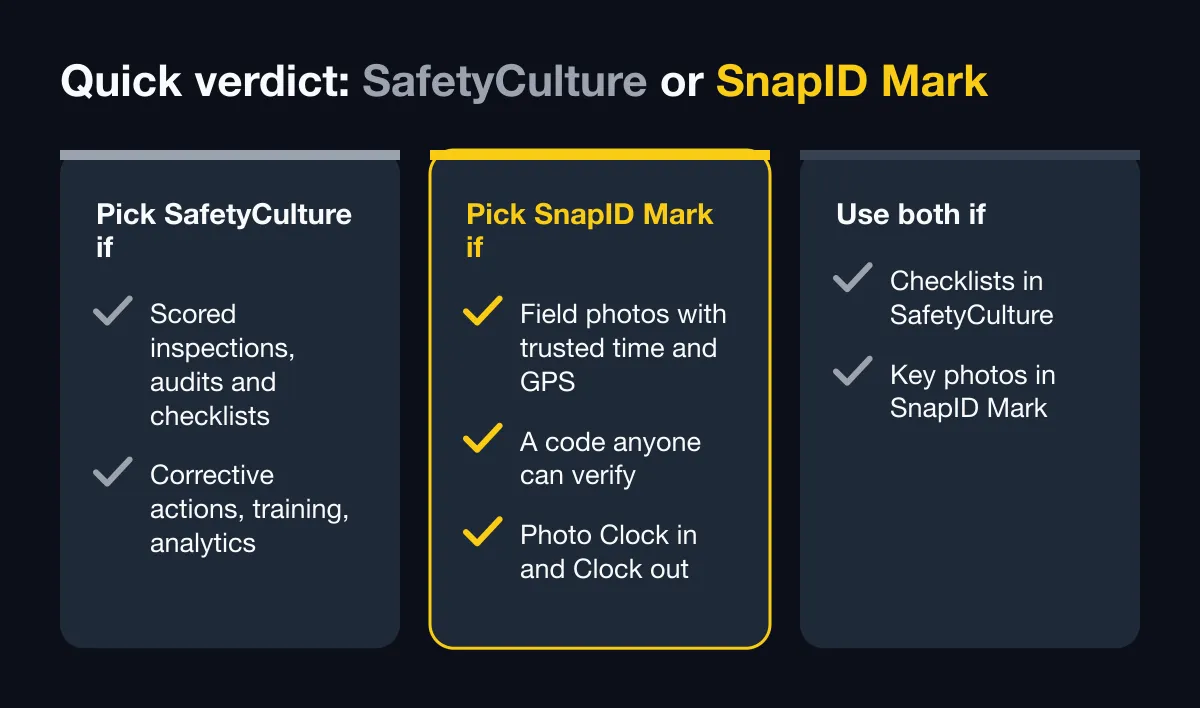
Quick verdict
| Your situation | Better fit |
|---|---|
| You run scored inspections, audits and checklists with corrective actions, training and analytics | SafetyCulture (Mitti) |
| You mainly need field photos with trusted time, GPS and a code anyone can verify, plus photo Clock in/Clock out | SnapID Mark |
| Inspections live in SafetyCulture, but clients or insurers ask whether photos are originals | Use both: SafetyCulture for the checklist, SnapID Mark for verifiable photos |
A note on the name: iAuditor, SafetyCulture, Mitti
The app was called iAuditor for years, then took the company name SafetyCulture. As of October 2026, safetyculture.com redirects to mitti.com, and the App Store listing shows the app as “Mitti (by SafetyCulture)”. People still search for all three names. In this article we say SafetyCulture, since that is what most readers type.
What SafetyCulture does well
According to the official site (mitti.com, its pricing and inspections pages) and the App Store listing, as of October 2026:
- Inspections and audits built from templates, with a drag-and-drop editor, a large public template library, and an AI assistant that can turn a photo, PDF, Word or Excel file into a checklist.
- Evidence inside inspections: photos and videos, photo annotations, e-signatures, GPS location and date and time on records, barcode and QR scanning.
- Offline completion on phone and tablet, with sync when the connection returns.
- Reports generated when an inspection is completed, with your logo and cover page, ready to share.
- Issues and actions: log hazards, incidents and near misses with photos and location, assign follow-up tasks, schedule recurring checks.
- Much more: training courses, asset maintenance, lone worker monitoring, sensors, document management, analytics, contractor management, an API and integrations.
- Plans: Free, Premium and Enterprise. The pricing page lists a free plan for small teams of up to 10 seats with up to 5 active inspection templates. Premium adds unlimited templates, advanced analytics, SSO and integrations. Check their pricing page for current details.
- Languages: the App Store listing shows English plus 13 other languages. Vietnamese is not in that list.
If your work is built around checklists, scoring and corrective actions, SafetyCulture is a mature, proven choice, and SnapID Mark does not replace it.
Where a lighter app can fit better
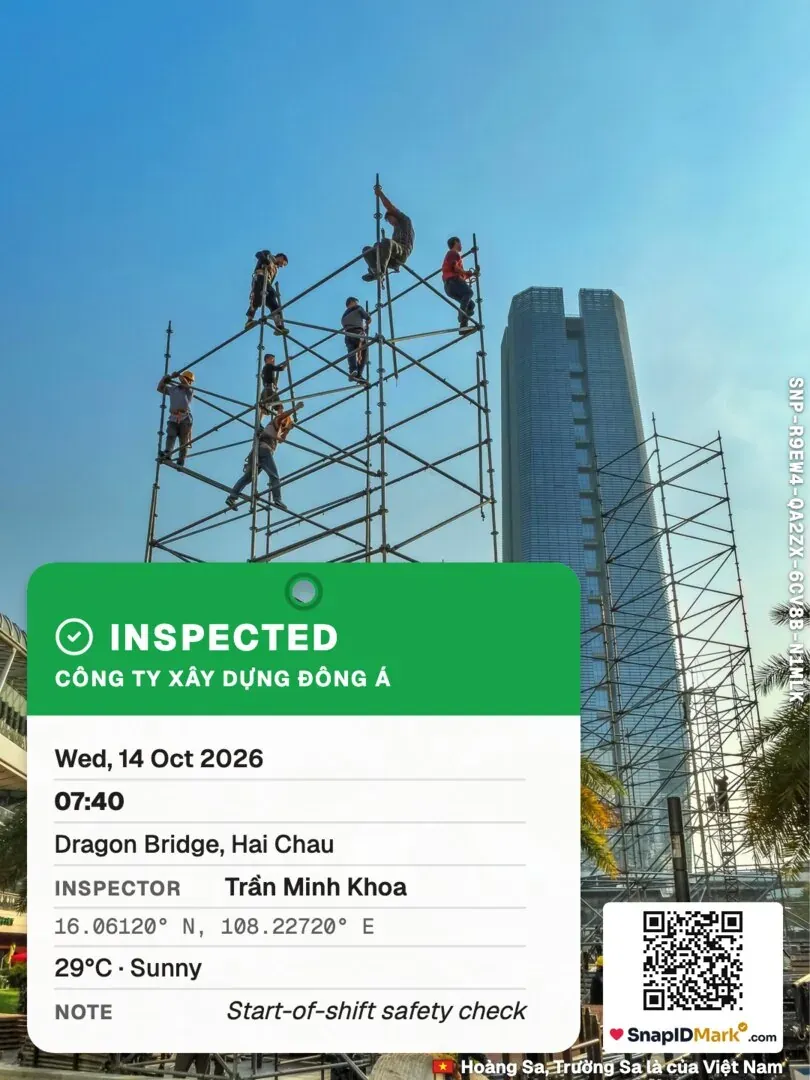
- The photo is the deliverable, not the checklist. A handover photo, a before and after shot, a delivery photo. You want time, address and coordinates printed on the image itself, not only stored in a report.
- People outside your company must check the photo. A client, a property owner or an insurer scans a QR code on the photo and sees when and where it was taken, without an account.
- You also need simple attendance. Crews Clock in and Clock out with a photo at the site, inside a geofence, and you export an Excel timesheet.
- Your crew works in Vietnamese or another language outside SafetyCulture’s list.
- Nobody has time to build templates. The camera opens and the photo is stamped. That is the whole workflow.
Feature comparison
| Criterion | SafetyCulture (per official pages) | SnapID Mark |
|---|---|---|
| Checklists, scoring, audits | Yes, core product | No |
| Corrective actions, task assignment | Yes | No |
| Photos in records | Yes, with annotations, GPS, date and time on records | Yes, every photo is stamped on the image |
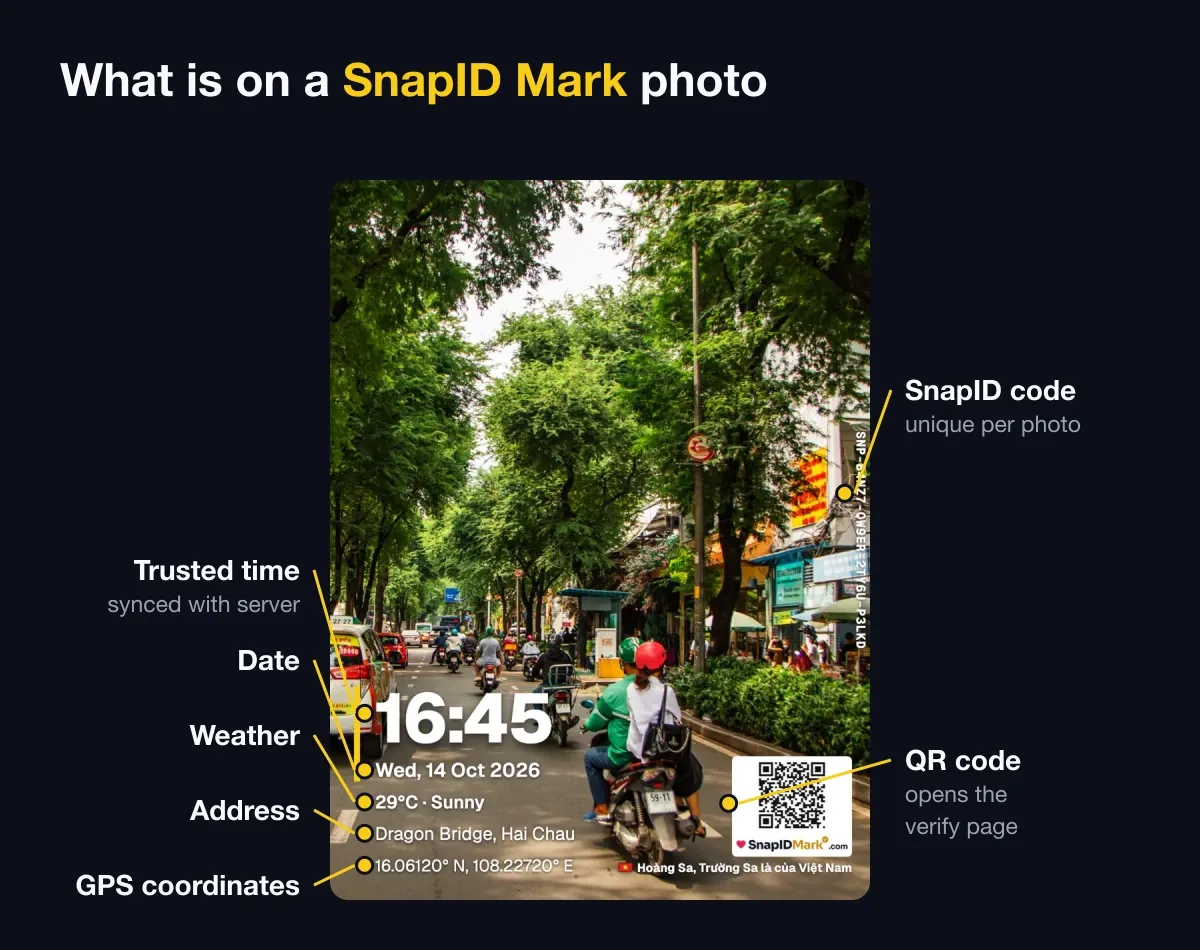
| Info printed on the photo | Not described as a stamp on the image | Trusted time, date, GPS and accuracy, address, weather, mini map, logo, notes, custom fields |
| Time source | Not described | Synced with SnapID servers; changing the phone clock does not change it |
| Recipient verifies a photo | Not described | SnapID code and QR, verify page without an account, SHA-256 file check in the browser |
| Fake GPS detection | Not described | Mock-location apps detected; workspaces block capture while one is on |
| Offline | Yes | Yes, trusted time and SnapID codes work offline |
| Attendance | Not a core feature on their pages | Photo Clock in/Clock out with geofence 20 m to 50 km, Excel timesheet |
| Reports | Branded inspection reports | PDF photo report, ZIP of originals, Excel export from the admin website |
| Training, assets, sensors | Yes | No |
| API, integrations, SSO | Yes (Premium and up) | No |
| Languages | English and 13 others per App Store | 19 languages incl. Vietnamese and English |
| Free tier | Up to 10 seats | Free for personal use (with ads); every workspace has 5 free seats |
In short: SafetyCulture is a platform for running inspections and operations. SnapID Mark is a camera for photos people can verify and photo attendance. The overlap is smaller than the names suggest.
Photo trust: the main difference
In an inspection app, the photo is one field among many. In SnapID Mark, the photo is the record. Each stamped photo gets a SnapID code (SNP-XXXXX-XXXXX-XXXXX-XXXXX) and a QR code. Anyone can open verify.snapidmark.com, enter the code or scan the QR, and see the capture time, a rounded area and integrity flags. They can also pick a file to compare its SHA-256 fingerprint with the original; the file is checked inside their browser and is not uploaded. See QR photo verification and detect edited photos with SHA-256.
This is not a legally certified timestamp. It is a practical way for a client to check that a photo is unchanged and was taken when it says.
Privacy and offline
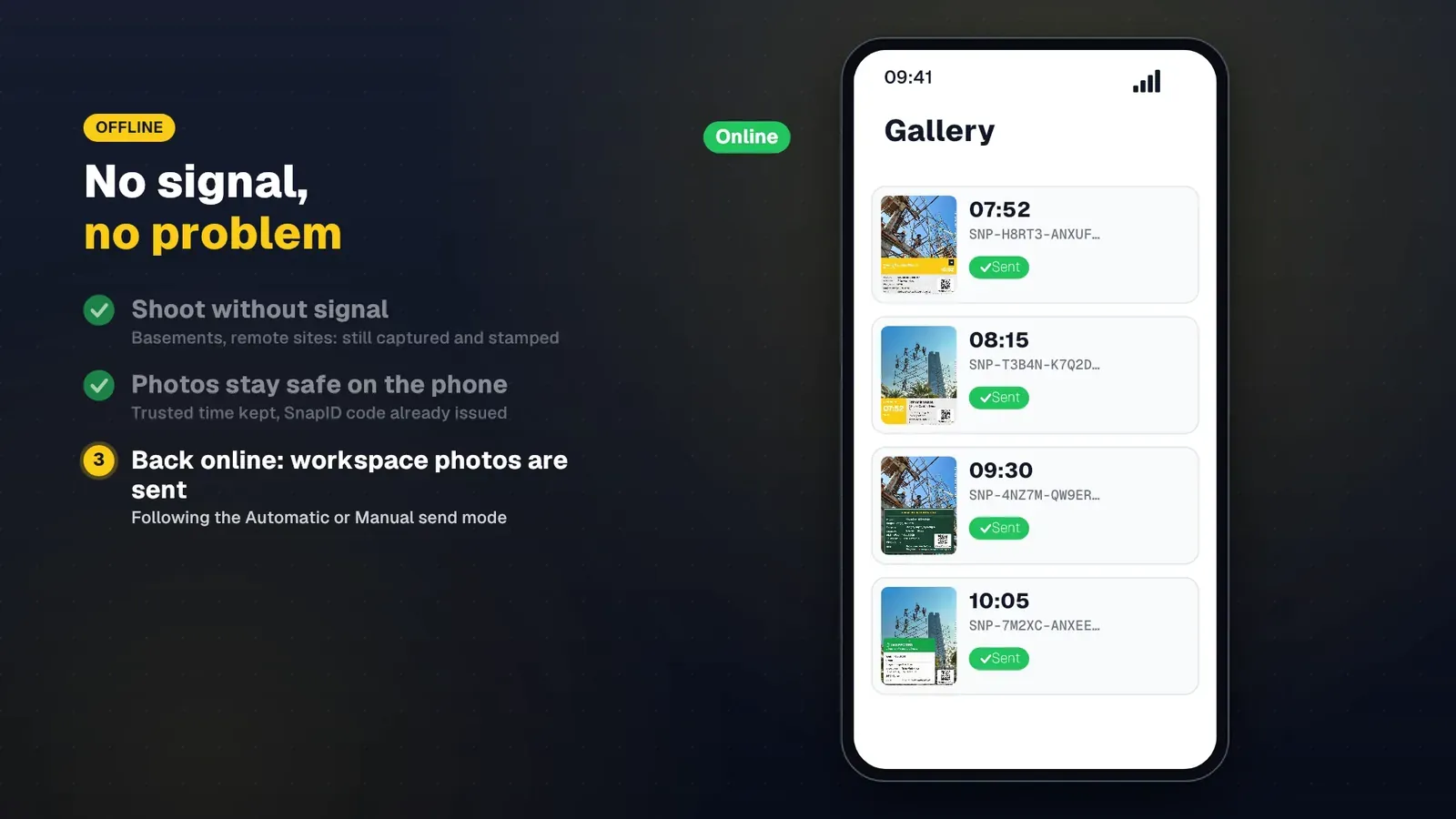
SnapID Mark reads location only while the app is open to take a photo or clock in. There is no all-day tracking. Personal photos stay on the phone and never upload by themselves. Workspace photos are sent according to the workspace’s sending mode (Automatic or Manual, Manual by default) and wait in a queue on the phone when there is no signal. Attendance photos are always sent right away, or queued until online. See offline photo proof.
What SnapID Mark does not have
- No checklists, forms, scoring or audit templates.
- No corrective actions, task assignment or scheduling.
- No training, asset maintenance, sensors or lone worker features.
- No API, integrations or SSO yet.
- No branded inspection report builder. You get a PDF photo report (2 photos per page, up to 200 photos), Excel and ZIP exports.
- No legally certified timestamp. See are timestamped photos valid evidence.
Who should pick which
- Pick SafetyCulture if you are a safety, quality or operations team that runs recurring inspections, needs scores and actions, and wants analytics across many sites.
- Pick SnapID Mark if you are a small contractor, cleaning company, field service team or property manager whose proof is mostly photos, and who wants attendance in the same app.
- Use both if your checklists are fine in SafetyCulture but disputes keep coming down to “when was this photo really taken?” Take the key photos in SnapID Mark and attach them or their verify links.
Try SnapID Mark alongside your current tool
- Install the app and take a first photo. See Take your first photo.
- Check the stamp: time, location, logo and custom fields such as a job code. See Stamp settings and Custom fields.
- Create a workspace on the admin website and invite 3 to 5 people. See Create a workspace and Invite members.
- For one week, take the photos that matter (handover, before and after, defects) in SnapID Mark and share the verify link with the client. See Share a verify link.
- Export a PDF or ZIP from the admin website and compare it with your current reports. See Export data.
FAQ
Is SafetyCulture the same as iAuditor?
Yes. iAuditor was the earlier name of the SafetyCulture app. As of October 2026, the official site redirects to mitti.com and the app is listed as Mitti by SafetyCulture.
Can SnapID Mark replace SafetyCulture inspections?
No. SnapID Mark has no checklists, scoring or corrective actions. It replaces the photo part when you need photos others can verify, and adds photo attendance.
Is SnapID Mark free?
Personal use is free with ads; Premium removes ads. Every workspace includes 5 free seats, and business plans of 10, 25, 50 or 100 seats are listed in the app and on the pricing section.
Does SnapID Mark work offline?
Yes. Photos are stamped with trusted time and a SnapID code without a signal. Workspace photos wait in a queue on the phone and send when you are back online.
Can clients check a photo without an account?
Yes. They scan the QR code on the photo or enter the code at verify.snapidmark.com. No account and no app needed.
Get started
Download SnapID Mark from the App Store or Google Play, then open the admin website to create a workspace. For more comparisons, read the Procore alternative for small contractors, the Raken and Fieldwire alternative and the CompanyCam alternative, or the construction inspection photo checklist.
SafetyCulture, iAuditor, Mitti and other app names in this article are trademarks of their respective owners and are used for descriptive purposes only. Information about other apps is based on their official pages as of October 2026 and may have changed.