
Replace WhatsApp Groups for Photo Reports (Keep the Chat)
WhatsApp, Zalo and Messenger groups are easy for daily photo reports, but photos get buried and compressed. A fair comparison and a 1-week switch plan.
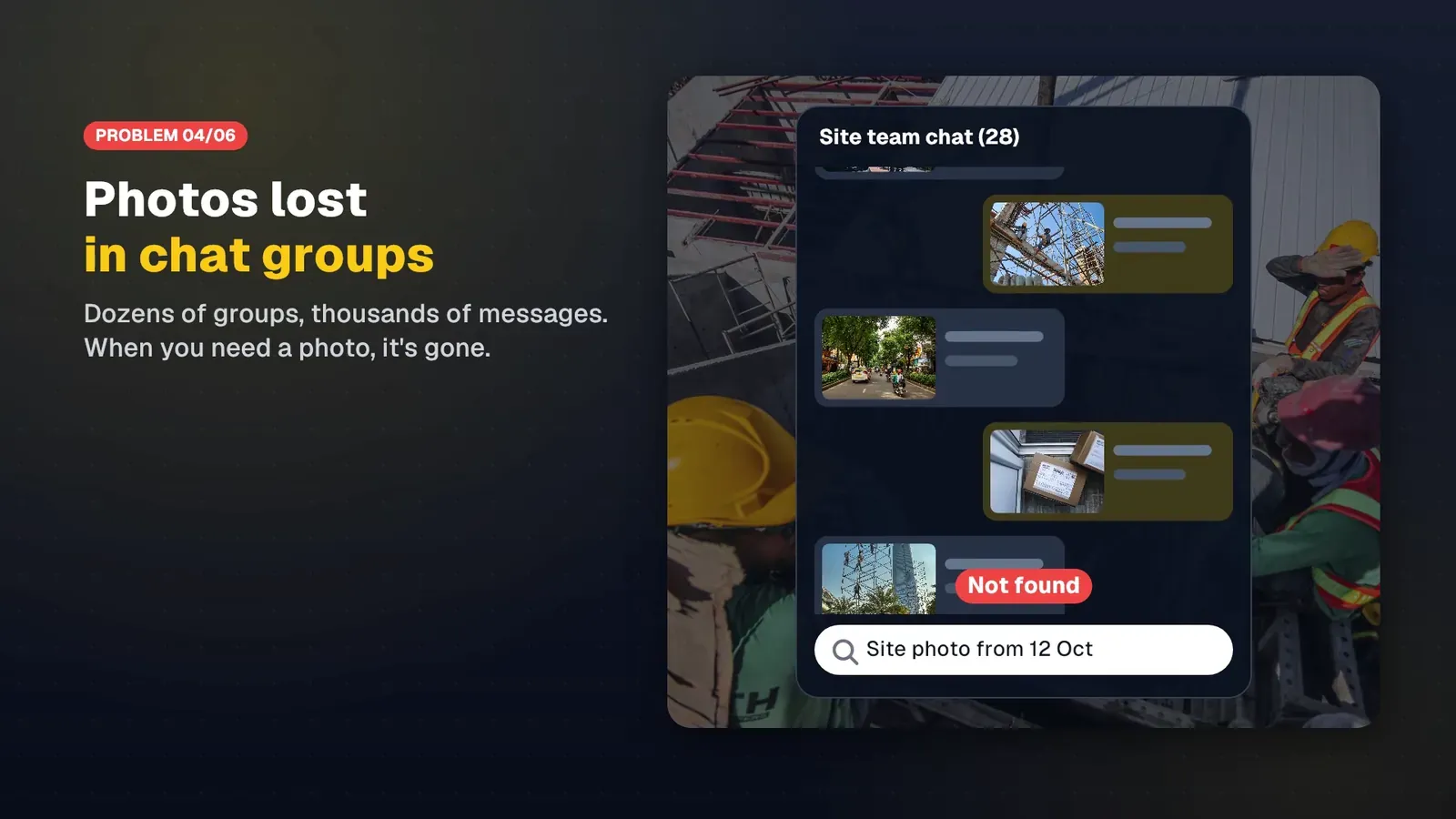
For many crews, the daily report is a chat group. Someone takes a photo, drops it into WhatsApp, Zalo or Messenger, the manager reacts with a thumbs up, and the day is done. It works until a client asks for “the photos of the slab pour on the 12th”, or payroll wants to know who was actually on which site. Then someone scrolls through thousands of messages, and the photos they find are compressed and missing their location data.
This post compares using chat groups for photo reports with a field photo app that has a shared workspace. We make SnapID Mark, so we will say plainly where chat groups are better and what SnapID Mark does not have. The short version: keep the chat for talking, move proof photos somewhere they can be found and checked.
Quick verdict
| Situation | Use |
|---|---|
| Quick questions, reminders, a photo to show what you mean | Chat group |
| Handover and inspection photos that may be questioned months later | SnapID Mark |
| You need to know who took a photo, when and where, and let outsiders check it | SnapID Mark |
| Photo clock-ins on job sites | SnapID Mark |
| Two or three people, short jobs, nobody asks for proof | A chat group is enough |
| Larger crews, several sites, demanding clients | Both: chat to talk, a workspace for photos |
What chat groups do well
To be fair, chat apps are popular for good reasons:
- Free, and everyone already has one. Nothing to install, nothing to teach.
- Instant. A photo lands, the whole group sees it, and people reply, call or follow up in the same thread.
- Two-way conversation. Managers give directions and workers ask back. SnapID Mark has no chat at all.
- Better-quality options exist. WhatsApp’s Help Center, as of October 2026, describes choosing Standard or HD quality before sending a photo, and Zalo Help describes ticking “HD” or sending a photo as a document.
- Some backup. According to Zalo Help as of October 2026, Zalo backs up text messages and saves chat photos to your Google Drive, but only checks photos sent in the last 120 days, and does not back up files, videos or photos from groups with more than 100 members. It points to its paid zCloud service for a full backup (check their pricing page).
If your team is small and mostly needs to talk, a chat group is a sensible choice. The trouble starts when the chat group also becomes the archive for proof photos.
Five weak spots when a chat group is your photo archive
1. Photos get buried
A 15-person site can produce hundreds of messages a day. The inspection photo sits between stickers, voice notes and “what time do we start tomorrow?”. Finding it by date is possible. Finding it by task, site or person is slow.
2. Compression and lost file data
When you send a photo the normal way, chat apps usually shrink it and may strip EXIF data such as capture time and GPS coordinates. The file the recipient saves is a different file, so it cannot be matched to the original. We cover this, and how to send originals, in send original photos without compression.
3. No trusted time or place
A chat photo only shows when it was sent, not when it was taken. A worker can shoot yesterday and post today. A photo from another site looks the same. In a dispute, the manager has nothing to point to except the sender’s word.
4. Staff leave with the photos
The originals live on each person’s own phone. When someone leaves the group or changes phones, the originals go with them. The company keeps only the compressed copies in the chat history, if they have not been deleted.
5. Hard to export
A weekly report for a client means downloading photos one by one, renaming them and pasting them into a document. That takes hours every week and things get missed.
Side-by-side comparison
| Criterion | Chat groups (per WhatsApp and Zalo help pages) | SnapID Mark |
|---|---|---|
| Cost to start | Free | Free for personal use; every workspace has 5 free seats |
| Conversation and comments | Yes, the main strength | No chat |
| Photo quality | Normal sends are compressed; HD or document options exist | Workspace photos are kept as original files with their data |
| Capture time | Only the message time | Synced with SnapID servers; changing the phone clock does not change it |
| Location | Not printed on the photo | Coordinates, accuracy and address printed on the photo |
| Outsiders verify a photo | Not described on their official pages | SnapID code, QR code, SHA-256 file check on the verify page |
| Filtering | By chat and date | By member, project, site, type, warnings, date, custom field |
| When someone leaves | Originals stay on their phone | Sent photos belong to the company and stay in the workspace |
| Reports | Manual | ZIP of originals with metadata.csv, Excel, PDF report |
| Attendance | No | Clock in and Clock out with photos, geofence check |
| Offline | Message waits to send | Trusted time still stamped; photos wait in an on-phone queue |
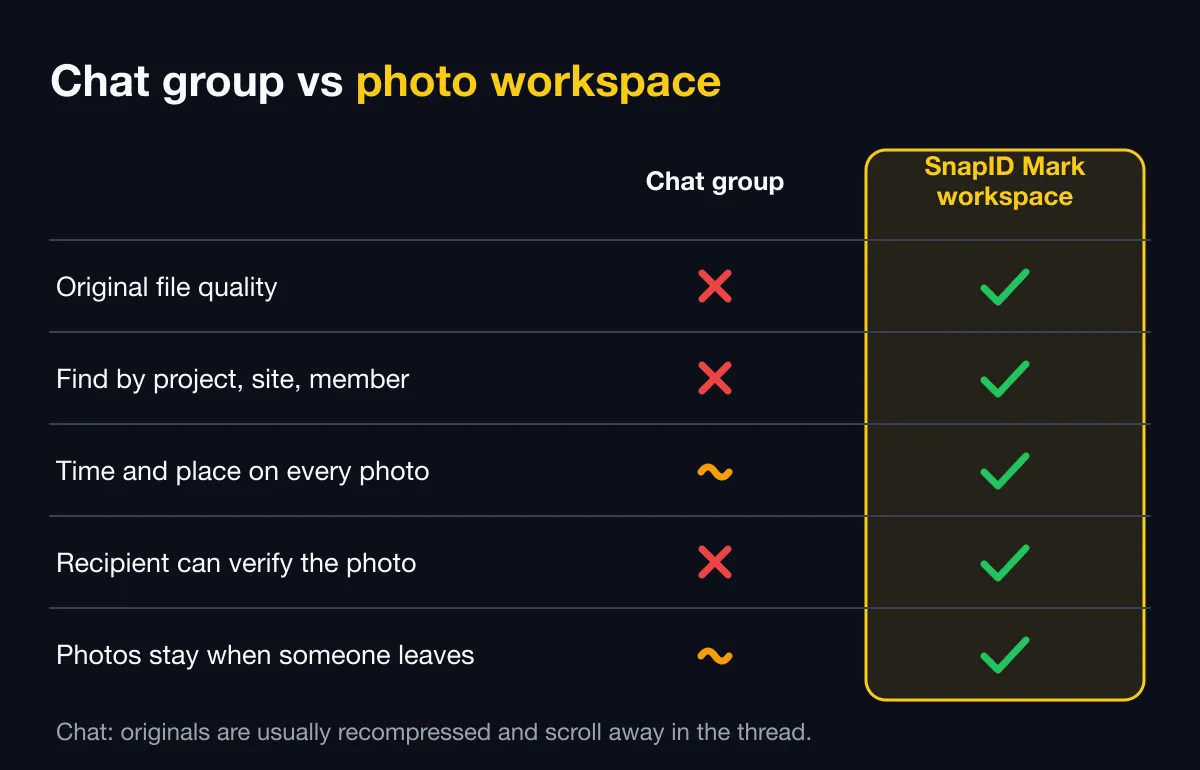
In short: chat groups win at conversation and familiarity. SnapID Mark wins at trusted time and place, one central archive, and reports you can export.
What SnapID Mark does not have
- No chat and no comments on photos. You still need WhatsApp, Zalo or similar to talk.
- No task assignment, forms or multi-step checklists.
- No API or integrations yet.
- Everyone needs their own phone and account, and a new workspace is approved by the SnapID team before use.
- A SnapID code lets recipients check a photo, but it is not a legally certified timestamp. See are timestamped photos valid evidence.
Who should pick which
- Chat group only if the team is very small, jobs are short and nobody asks for photo proof.
- Move photos to SnapID Mark if you have lost time hunting for photos, had a client doubt that a photo was current, or need clock-ins on site.
- Use both, which is what most teams end up doing: the chat group for reminders and questions, SnapID Mark for stamped photos. When needed, a worker posts a verify link or a stamped photo with its QR code in the chat, and anyone can scan it.
If your team uses a shared Google Drive folder instead of a chat group, read Google Drive and Google Photos vs a field photo app. If you are weighing other construction photo apps, see the CompanyCam alternative and the Raken and Fieldwire alternative.
Switch in one week
- Create a workspace on the admin website and wait for approval. See Create a workspace.
- Add projects and sites with a geofence radius. Pick a required stamp template with your logo. See Template rules.
- Invite your crew by link or code, posted in the chat group you already have. See Invite members.
- Choose the sending mode: Automatic or Manual (Manual is the default). See Upload mode.
- Agree on one rule: a handover photo counts only if it is in the workspace. The chat group is for talking.
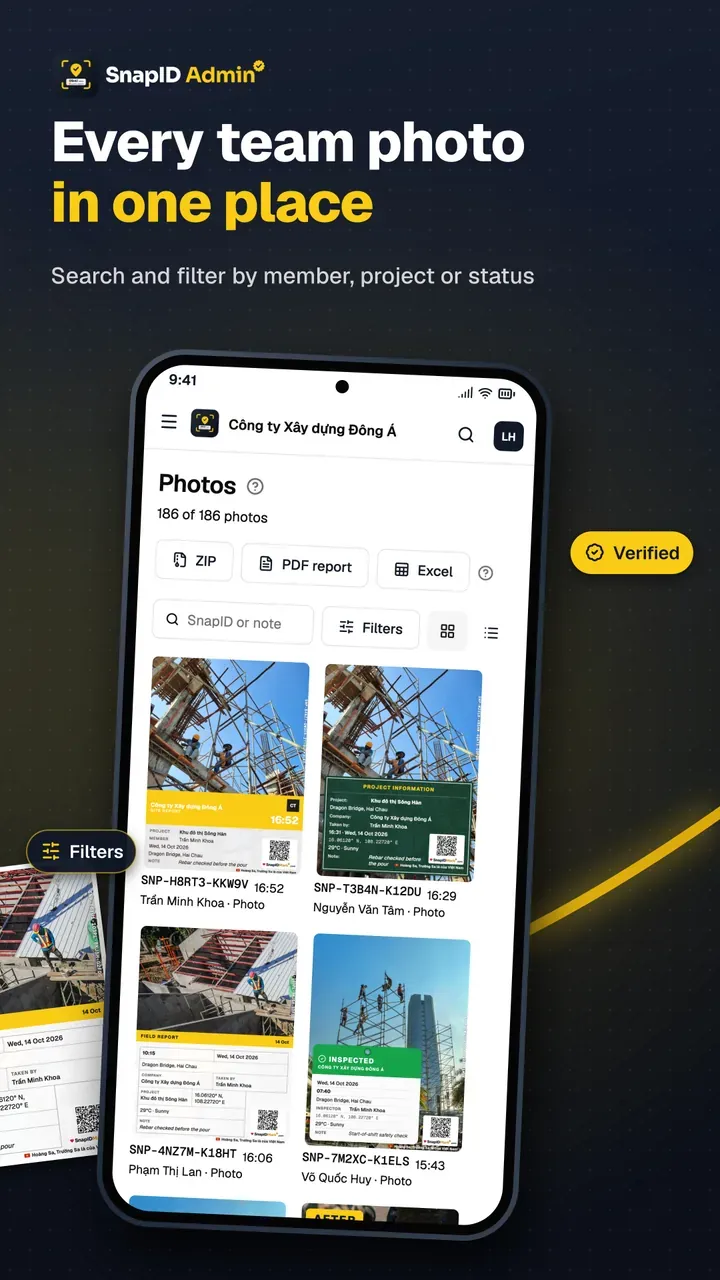
- At the end of the week, filter photos by project and export a PDF report for the client. See Export data.
FAQ
Do we have to leave our WhatsApp group?
No. The chat group is still the best place to talk. Move only the proof photos into a workspace so they are stored in one place and easy to find.
Does WhatsApp compress photos?
Photos sent the normal way through chat apps are usually compressed. WhatsApp’s help pages describe an HD option, and sending as a document keeps the file, but capture time and location are still not printed or verifiable on the photo.
If I post a SnapID Mark photo in a chat group, is it still useful?
Yes. The stamp and QR code stay visible even after compression, and anyone can scan the QR to open the verify page. Only the SHA-256 file comparison needs the original file. See QR photo verification.
What if my crew is not comfortable with new apps?
SnapID Mark opens straight into the camera. Workers pick a project and tap the shutter. The app is available in 19 languages.
What happens to photos when someone leaves?
Photos sent to the workspace belong to the company and stay on the admin website. Their personal photos stay only on their own phone.
Get started
Download SnapID Mark for your team, or get it on the App Store and Google Play, then create a workspace on the admin website. Read more on organizing field photos by project and the construction progress photo report.
WhatsApp, Zalo, zCloud, Messenger, Google Drive and other app names in this article are trademarks of their respective owners and are used for descriptive purposes only. Information about other apps is based on their official pages as of October 2026 and may have changed.