
Security Guard Patrol App: Post Clock-Ins and Patrol Photos
Security guard patrol app guide for guard firms and building managers: post clock-ins, patrol and incident photos with trusted time, client proof.
Every guard company hears the same question from clients sooner or later: “Did anyone actually patrol last night?” A handwritten log is hard to check. Photos dropped into a chat group get buried, and they do not prove when or where they were taken. Building managers have the same need: they want to know the guard was at the post on time, and they want clear photos when something goes wrong.
This guide is for security companies and property managers looking for a security guard patrol app. We make SnapID Mark, a camera app that stamps photos and runs photo attendance. To keep it fair, we compare it with dedicated guard tour systems using their official pages, and we list plainly what SnapID Mark does not do.
Quick verdict
| If you need | Pick |
|---|---|
| NFC tag or QR checkpoint scans on a fixed patrol route | A dedicated guard tour system |
| A panic button, live map tracking, shift scheduling | A dedicated guard tour system |
| Post clock-ins with a photo, patrol and incident photos with trusted time, GPS and a code clients can verify | SnapID Mark |
| A small site, a few guards, a quick start with nothing to install on walls | SnapID Mark |
| You already run a guard tour system, but clients want photo proof they can check themselves | Use both |
What dedicated guard tour systems do well
Three examples, based on each product’s official website or App Store listing as of October 2026:
- TrackTik (part of Trackforce): checkpoints recorded by QR code, NFC tag or geolocation; tours shown live on a map in a web command center; a panic button, a dropped-device alert and push-to-talk; configurable incident and daily activity reports with photos, video and GPS; post orders by client, site or post; visitor management. iOS and Android apps.
- QR-Patrol: NFC, QR and beacon checkpoints; guard GPS monitoring with real-time alerts; SOS and man-down alerts; photos, voice messages, notes and signatures attached at checkpoints; patrol schedules; daily activity reports. The site offers a public test account, and plans are priced per guard, so check their pricing page.
- mTracker, security edition (MobiFone, Vietnam): per its App Store listing, the app uses GPS and QR scanning, lets managers see photos from patrol points, and monitors guard patrol schedules.
If a contract requires proof that every checkpoint was visited in order, or your guards work alone and need a panic button, these systems are clearly stronger than SnapID Mark.
Comparison: guard tour system vs a stamped photo app
| Criterion | Dedicated guard tour system (per official pages) | SnapID Mark |
|---|---|---|
| NFC, QR or beacon checkpoints | Yes | No. Guards take a photo at the point and pick its name in a custom field |
| Live location tracking | Yes | No. Location is read only while the app is open to take a photo or clock in |
| Panic or SOS button | Yes | No |
| Scheduling, patrol schedules | Yes | No |
| Clock in at the post | TrackTik mentions time and attendance, see their site for details | Clock in and Clock out with a photo, checked against a 20 m to 50 km geofence |
| Photo time independent of the phone clock | Not described on their official pages | Yes, server-synced time; changing the phone clock does not change it |
| Clients verify photos without an account | Not described on their official pages | SnapID code, QR code and SHA-256 file check on the verify page |
| Mock-location detection | Not described on their official pages | Yes, workspaces block capture while a mock-location app is on |
| Works offline | Not described on the pages we checked | Yes, photos keep the capture time and send when online |
| Hardware on site | Tags or codes mounted at each point | Nothing to mount |
| Free tier | Check their pricing page | 5 free seats in every workspace |
Clock in at every guard post
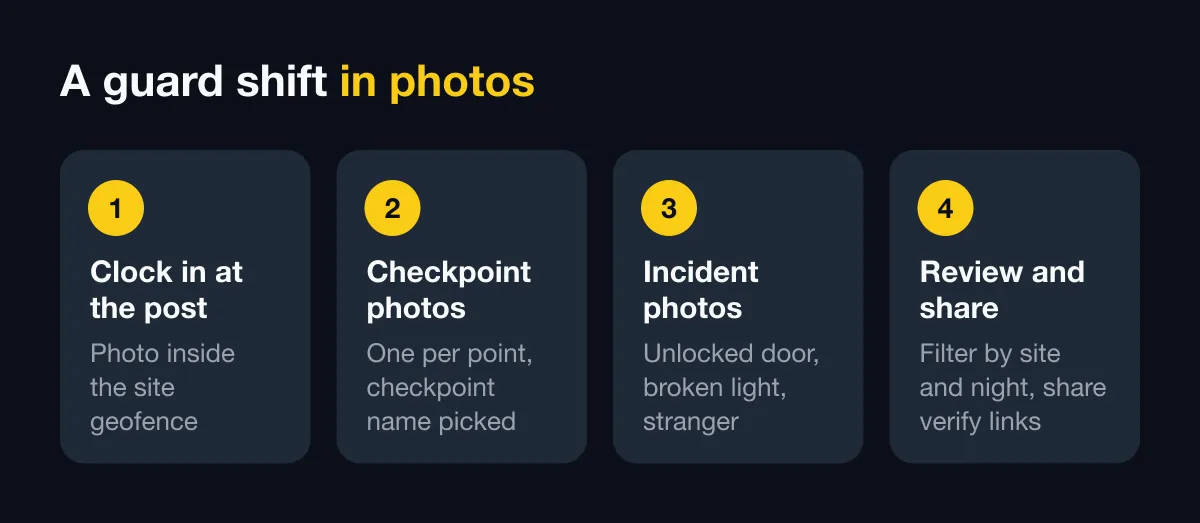
Each guarded location (an office tower, factory, warehouse or construction site) is a site on the admin website, with a center and a geofence radius. The guard opens the app, picks Clock in and takes a photo at the post. The photo carries trusted time, coordinates, GPS accuracy and a SnapID code. If you turn on clock-in only inside a geofence, a guard standing outside the radius cannot clock in.
In the rulebook you set shift start, the late-after time, work days, breaks and the time zone. The Owner and Admins see who was on time, who was late and hours worked per day, then export an Excel timesheet. Companies guarding many sites across a city can also read multi-location attendance. Setup steps are in photo attendance and rulebook.
Attendance photos are always sent right away, even when the workspace uses Manual sending. In a basement with no signal, the photo waits on the phone and uploads once a connection returns, and the time on the photo is still the capture time.
Patrol photos at checkpoints
SnapID Mark has no NFC tags or QR stickers on walls. The alternative is a stamped photo at each point:
- Create a required stamp template for the workspace and add custom fields such as “Checkpoint” and “Site”. See custom fields.
- On patrol, the guard takes one photo at each point (fire exit, car park, electrical room, back gate) and picks the checkpoint name.
- The photo carries trusted time, address, coordinates and accuracy. Photos taken outside the site’s geofence are flagged for the Owner and Admins to review.
- On the admin website, filter photos by site, date, member or custom field to see how many rounds were done in a night.
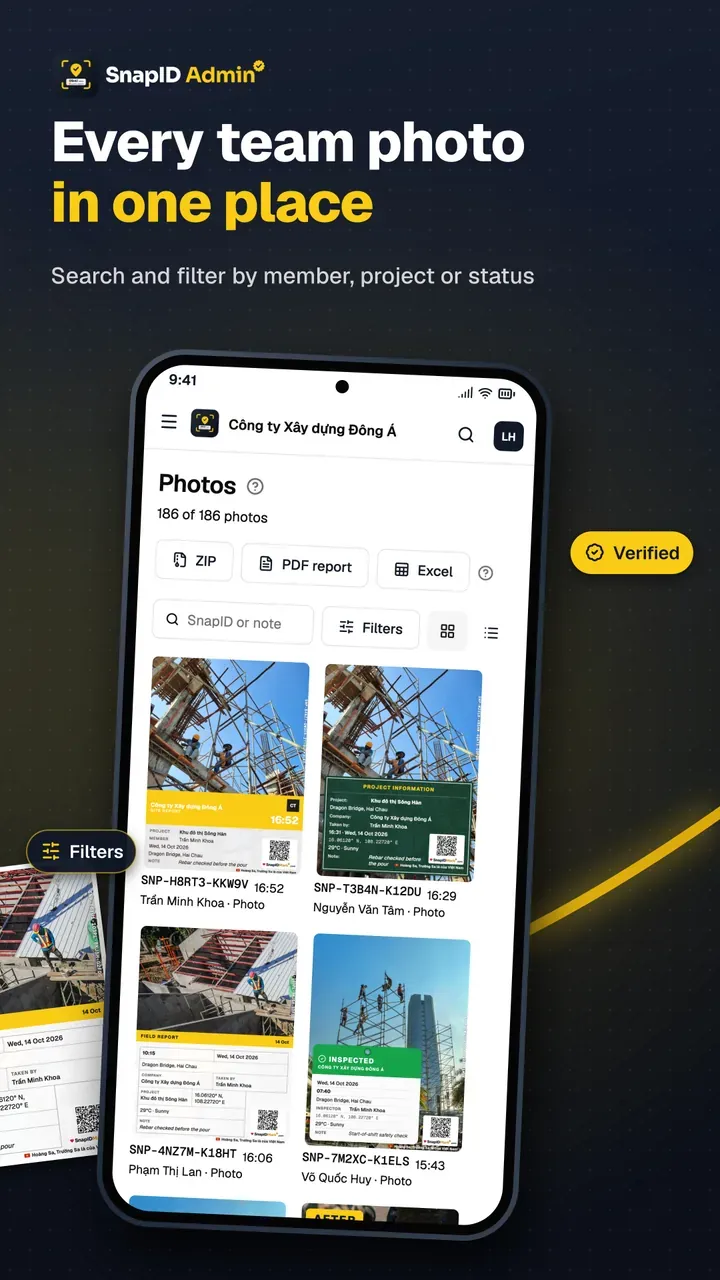
This shows who, when, where and what they saw. It does not enforce route order the way tag scanning does. If your contract demands that, use a dedicated guard tour system.
Incident photos and shift handover
When a guard finds an unlocked door, a crack, a broken light or a stranger, they take a photo with a note. Weather and a mini map can be stamped too. Stamped video works as well: the video stays on the phone, and the workspace receives a record, a few stamped frames and a hash.
At handover, the outgoing guard photographs the logbook, keys and the CCTV screen, then clocks out. The incoming guard photographs the same state on arrival. Two sets of photos with trusted time settle “was it the last shift or this one?” quickly. To stop running all of this through a chat group, see replace chat groups for photo reports.
Client proof with QR codes and verify links
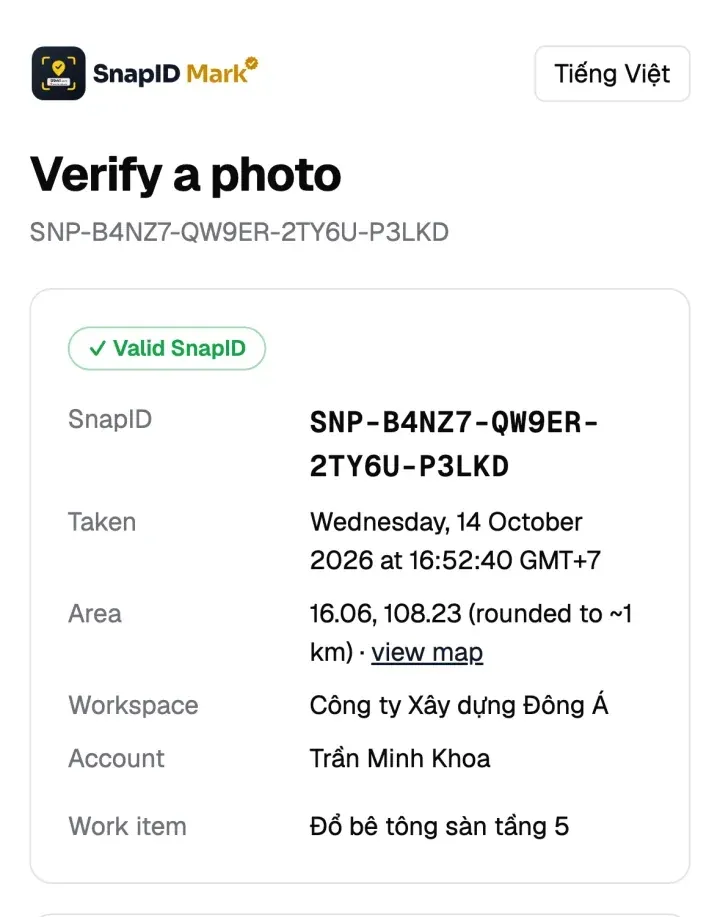
Clients of a guard company (property managers, factory owners) often want to check for themselves. Every photo has a SnapID code and a QR code. The client scans the QR or types the code on the verify page, with no account, and sees the capture time, a rounded area, the workspace and integrity flags. They can also pick the file they received and compare its SHA-256 fingerprint with the original inside the browser. See QR photo verification and time-limited share links.
At month end, export a PDF report (up to 200 photos, 2 per page) or a ZIP of originals with metadata.csv per site. See export data. Note that a SnapID code lets recipients check a photo, but it is not a legally certified timestamp.
What SnapID Mark does not have
- No NFC, QR or beacon checkpoints, and no route-order checks.
- No live tracking or all-day GPS tracking.
- No panic button, SOS or man-down alerts.
- No scheduling, patrol rostering, post orders, or multi-step forms and checklists.
- No visitor management, chat or shared kiosk.
- No payroll, and no API, integrations or SSO yet.
Who should pick which
- Large guard companies with many sites and contracts that require routes and alarms: a dedicated guard tour system.
- Small teams, or building managers running their own guards, who need post clock-ins and photo proof: SnapID Mark covers it and starts quickly.
- Already on a guard tour system: keep it, and add SnapID Mark for incident photos and client-facing proof that recipients can verify.
Comparing other attendance apps too? See the Connecteam alternative and the Jibble alternative.
Run a one-week pilot
- Create a workspace on the admin website. New workspaces are approved by the SnapID team. See create a workspace.
- Add each guarded location as a site with a suitable radius, and set shift times in the rulebook.
- Build a required template with a “Checkpoint” field and lock it for the workspace. See template rules.
- Invite the guards of one site by code or link. See invite members.
- After 7 days, export the Excel timesheet and a PDF of patrol photos, and send them to the client with a verify link.
FAQ
Can SnapID Mark replace a tag-scanning guard tour system?
Not fully. It proves a guard was at a point with photos carrying trusted time and GPS, but it has no NFC or QR checkpoints and no route-order checks. If your contract requires tag scans, use a dedicated guard tour system.
Are guards tracked during the whole shift?
No. The app reads location only while it is open to take a photo or clock in, never in the background. See phone permissions.
What if a guard uses a fake GPS app?
In a workspace, capture is blocked while a mock-location app is detected. Rooted or jailbroken phones are flagged, and the company can block them. See how to stop attendance fraud.
Does it work in a basement with no signal?
Yes. Photos keep trusted time using a clock counted from the last sync, wait on the phone and send when online. Late uploads are flagged for Admins to cross-check.
Is it free?
Every workspace includes 5 free seats, enough for a small site. Larger teams choose a 10, 25, 50 or 100-seat plan; see pricing.
Get started
Download SnapID Mark from the App Store or Google Play, then create a workspace on the admin website. Also useful: cleaning and facility photo proof for the cleaning crew in the same building, and clock in with a phone app.
TrackTik, Trackforce, QR-Patrol, mTracker, MobiFone and other names in this article are trademarks of their respective owners and are used for descriptive purposes only. Information about other apps is based on their official pages as of October 2026 and may have changed.